

Easier to Use Openai Alternative
If you want an easier to use OpenAI alternative for learning how markets actually work, our pick is Gobi: a free practice trading app for iOS and Android with a built-in AI coach, Ask Gobi, that explains your simulated trades on live prices. Gobi is not a general chatbot, an image generator, or an API replacement. For writing, coding, or research, Claude, Gemini, Perplexity, and Microsoft Copilot each remove a specific piece of ChatGPT friction, and we rank them below by the job each does best.
Key takeaways
- Gobi gives you virtual funds, live prices for crypto, stocks, and commodities, and an AI coach that opens from inside a position, so there is no prompt writing to learn. 54,052 people had tried it as of Oct 17.
- Claude and Gemini both offer free tiers with no credit card; their published paid plans are $20 per month and $19.99 per month respectively (confirm on each vendor's site).
- Perplexity answers basic questions without creating an account, which makes it the fastest zero-setup option on this list.
- Ollama is the simplest local option, but it still requires installing software and downloading a model file.
- For developers, OpenRouter and Groq expose OpenAI-compatible endpoints, so switching usually means changing a base URL and an API key.

What makes an OpenAI alternative easier to use?
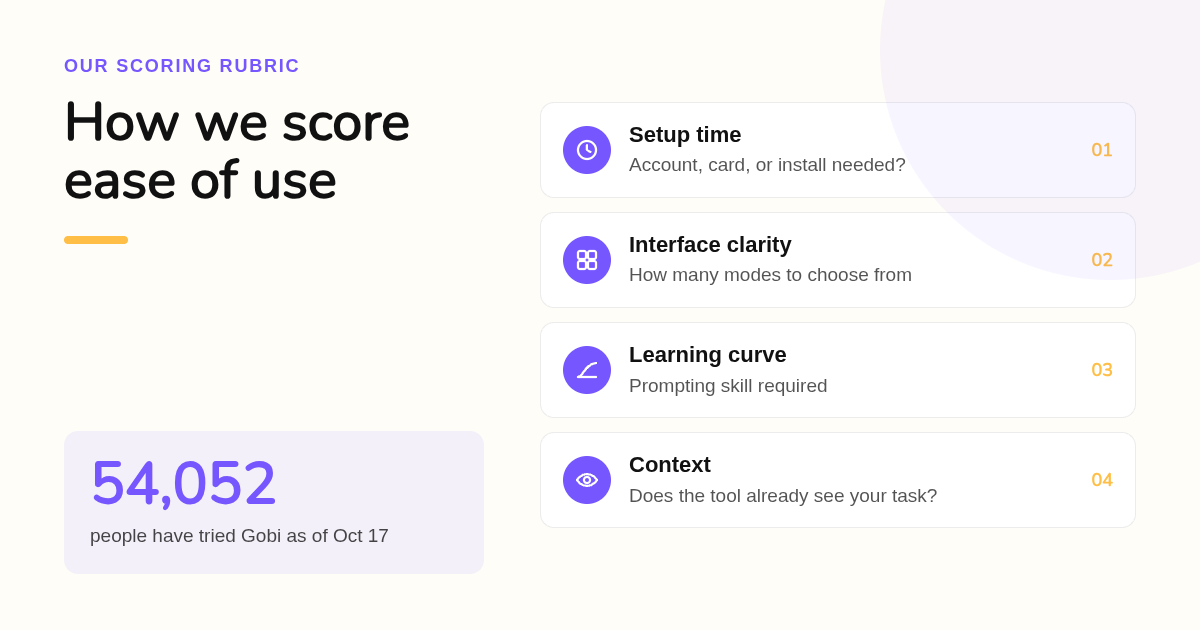
An easier to use alternative scores well on three measurable things: setup time, interface clarity, and learning curve. Setup time is how fast you reach a useful answer without an account or card. Interface clarity means fewer modes and menus. Learning curve is how much prompting skill the tool expects before it actually helps you.
ChatGPT is not hard to open. It is hard to use well, because a blank box assumes you already know what to ask. That gap is the real friction for beginners.
Pew Research Center has tracked chatbot adoption for several years, and its surveys consistently show far more adults who have tried a chatbot than adults who use one regularly. Trying is easy; getting repeat value is not.
So we score ease of use on what happens after the first message. Does the tool know your context? Does it tell you when it is guessing? Can you check its answer?
A simple decision rule: if you cannot name the task in one sentence, a purpose-built tool will beat a general chatbot. If you can, pick the general tool with the fewest extra modes.
Which five tools cut the most ChatGPT friction, and for whom?
Ranked by the job each does best: Gobi for learning to trade with an AI coach that already sees your position, Claude for writing and long documents, Gemini if you live in Google apps, Perplexity for research with no account, and Microsoft Copilot for Windows and Office users. All five have free tiers.
- Gobi: best when you want AI help understanding a trade. Gobi is a free trading simulator for iOS and Android. You get virtual funds, long and short practice trades on real market prices across crypto, stocks, and commodities, configurable leverage and margin, and an AI coach you can open from a position. The leverage math is shown plainly: $500 of virtual margin at 10x means $5,000 of market exposure. Gobi is available in English, Spanish, Simplified Chinese, Traditional Chinese, French, and Arabic. Honest limit: it is an educational simulator only. It will not write your essay, debug your code, or execute real trades, and price feeds can lag or pause, so the app tells you to check the current screen before confirming.
- Claude (Anthropic): best for writing and long documents. Claude's free tier needs an email but no card, and the interface has fewer modes than ChatGPT. You can paste or upload long documents and images and get a coherent answer without extra setup. The published Claude Pro plan is $20 per month; confirm current pricing on anthropic.com. Honest limit: free usage caps reset on a rolling window, so heavy daily use will hit a wall, and Claude does not generate images.
- Gemini (Google): best if you already live in Google apps. If you are signed into Google, Gemini is already waiting in Gmail, Docs, Android, and the Gemini app. The free tier supports image upload, file analysis, and web-grounded answers. The published Google AI Pro plan is $19.99 per month; confirm on google.com. Honest limit: your history is tied to a Google account and its activity controls, and the model picker adds a decision ChatGPT users may not want.
- Perplexity: best for research with zero setup. You can type a question at perplexity.ai and get a cited answer without creating an account, which no other tool here matches for first-minute friction. Perplexity Pro is published at $20 per month; confirm on perplexity.ai. Honest limit: it is search-first, so long creative drafting is weaker, and cited sources still need to be opened and checked.
- Microsoft Copilot: best for Windows and Office users. Copilot is free on the web, in Windows, and in the Edge browser, and it uses OpenAI models under a simpler consumer interface. Copilot Pro is published at $20 per month for Microsoft 365 integration; confirm on microsoft.com. Honest limit: identity, memory, and settings live in your Microsoft account, and the work version with document access is a separate enterprise product.
| Option | Best for | Pricing or format | Standout limit |
|---|---|---|---|
| Gobi | Learning to trade with an AI coach tied to live-price practice positions | Free mobile app on iOS and Google Play, virtual funds only | Not a general chatbot; no real trading, no essays or code |
| Claude | Writing, editing, and long documents | Free tier; Pro published at $20/month | Free usage caps; no image generation |
| Gemini | People already inside Google apps | Free tier; Google AI Pro published at $19.99/month | Tied to a Google account and its activity controls |
| Perplexity | Cited research with no account | Free without login; Pro published at $20/month | Search-first, weaker for long creative work |
| Microsoft Copilot | Windows, Edge, and Office users | Free on web and Windows; Copilot Pro published at $20/month | Settings bound to a Microsoft account; enterprise version separate |
Free alternatives beyond this five also exist. DeepSeek offers a free chat app, Mistral's Le Chat has a free tier, and HuggingChat runs open models in a browser. They are good value, but each adds an account step or a model choice that the five above handle more simply.
Is Claude or Gemini easier to use than ChatGPT?
At the chat level, both are about as easy as ChatGPT, with two practical differences. Claude has fewer modes to pick from and accepts long pasted documents without setup. Gemini is easiest if you are already signed into Google, because it sits inside Gmail, Docs, and Android. Everyday output quality is comparable across all three.
On quality, the gap between leading models has narrowed. The Stanford Institute for Human-Centered AI publishes an annual AI Index that tracks how closely top models cluster on public benchmarks, and for studying, summarizing, or drafting, the differences rarely decide the outcome.
For studying specifically, Claude's long-context handling makes it easy to paste an entire chapter and ask for a quiz. Gemini's free image upload makes it easy to photograph a worked problem and ask what went wrong.
On privacy, do not assume. Both Anthropic and Google publish a setting that controls whether your conversations can be used to improve models. Open it once, choose, and move on.
One more honest note: if you are on the Reddit threads asking for an easier to use OpenAI alternative, most answers there name Claude for writing and Gemini for Google users. Our ranking agrees on those two jobs.
How do developers switch away from the OpenAI API with minimal code changes?
Choose a provider with an OpenAI-compatible endpoint, change the base URL and API key in your existing client library, and rerun your test suite. OpenRouter, Groq, Together AI, and the Gemini API all document this mode. Expect small differences in tool calling, streaming, and token limits, so keep a regression set of prompts.
The practical migration order is short. First, export twenty real prompts with expected outputs. Second, point your client at the new base URL. Third, compare outputs and latency before touching production.
OpenRouter is the easiest single switch because it fronts many models behind one key and one endpoint, and it bills per token with no subscription. Groq is the easiest when speed matters, since it publishes per-token rates and an OpenAI-compatible path. We do not quote per-token prices here because they change often; read each provider's pricing page on the day you decide.
If you want governance language for that decision, the NIST AI Risk Management Framework gives a vendor-neutral checklist for documenting model changes, which is useful when you swap providers and need to explain why.
Should you run a ChatGPT alternative locally?
Only when privacy or offline access matters more than convenience. Ollama and LM Studio are the easiest local options, but you still install software, download a model file that can be several gigabytes, and accept slower, weaker answers on a laptop. For most beginners, a free hosted tier is easier and good enough.
Ollama is free and open source, and its GitHub repository is where most "easier to use OpenAI alternative github" searches end up. It also exposes an OpenAI-compatible local endpoint, so developer code written for OpenAI can point at your own machine.
LM Studio adds a graphical model browser, which removes the terminal step. Jan does something similar with a chat-first layout. Both are easier than Ollama alone, but none is easier than opening a browser tab.
Our rule: run locally if your data cannot leave the machine. Otherwise, use a hosted free tier and spend your time on the task instead of the setup.
Why is a purpose-built AI coach easier than a general chatbot for learning to trade?
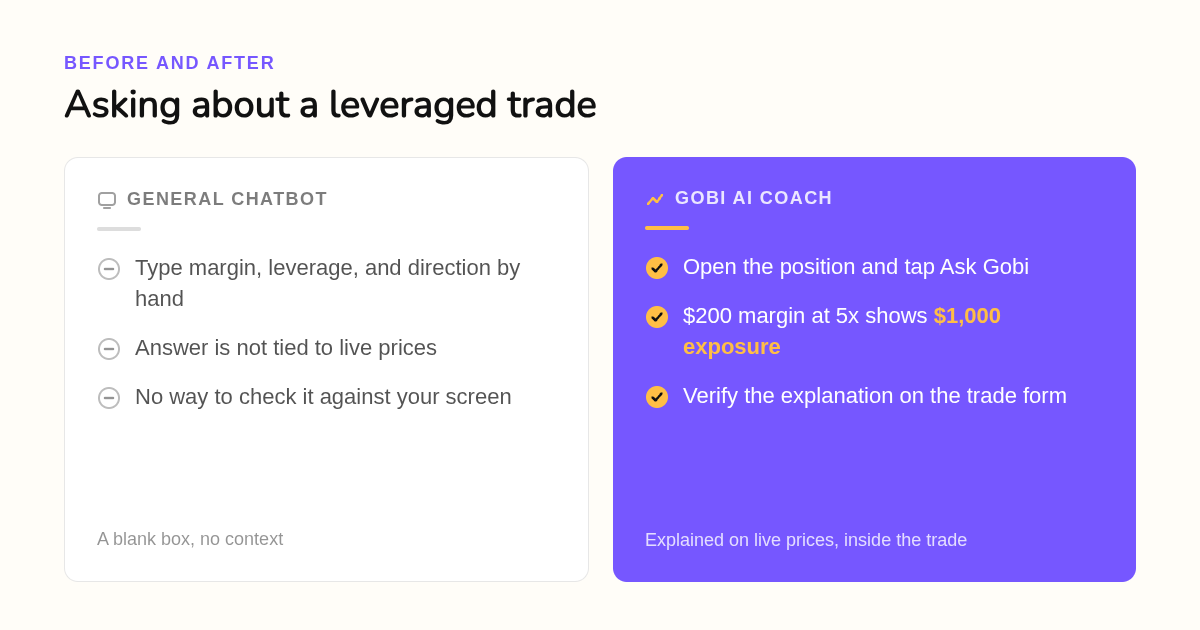
Because the context is already loaded. In Gobi you open a practice position and ask the coach about it, and it can see the direction, leverage, margin, and funding line of that trade. With a general chatbot you would type all of that in yourself, and the answer would still not be tied to live prices.
Here is the difference in practice. Imagine two virtual long positions, each with $200 of margin. At 2x, exposure is $400; at 5x, it is $1,000. A 2% price drop produces roughly $8 and $20 of price-related loss respectively, before costs.
Ask a general chatbot about that and you must describe every number first. In Gobi, the trade form already shows amount, exposure, and leverage, and the Ask Gobi AI coach guide walks you through asking for an explanation you can check against the screen.
The coach is not a forecast engine. Gobi's own guide says you still review and confirm every practice trade yourself, and an AI answer is not a guaranteed prediction. That honesty is part of why it is easier: you learn to verify instead of trusting.
Margin and leverage are also where beginners get hurt with real money. The U.S. Securities and Exchange Commission's investor education site at investor.gov explains that leverage magnifies losses as well as gains, which is exactly the mechanic a simulator lets you feel without the bill.
If you want to go deeper, the perpetual futures paper trading page explains how funding, margin, and liquidation show up in a simulated perpetual position, with the same virtual-balance rules.
Which option should each type of user pick?
Match the tool to the person, not the leaderboard. Students get the most from Claude or Gemini free tiers. Casual users who hate signing up should start with Perplexity. Developers should route through OpenRouter or Groq. Privacy-first users should run Ollama. Anyone learning to trade should use Gobi, because its AI coach is tied to simulated positions.
| User type | Single easiest pick | Why |
|---|---|---|
| Student | Claude or Gemini free tier | Long-document handling and free image upload, no card required |
| Casual user | Perplexity | Answers without an account, cited sources to check |
| Developer | OpenRouter | One key, OpenAI-compatible endpoint, pay per token |
| Privacy-focused | Ollama | Runs on your machine, nothing leaves the device |
| Learning to trade | Gobi | Free virtual funds, live prices, AI coach inside the position screen |
Two notes on that table. Image upload is free on Claude, Gemini, and Copilot, so the "ChatGPT alternative with image upload free" question has three good answers. And Gobi is the only row where the AI never needs a prompt about what you are looking at, because it is already looking at it.
Gobi also fits a global audience in a way the others only partly do. It is available in multiple languages, including Spanish, French, Arabic, and both Simplified and Traditional Chinese, and it runs on both app stores. The About Gobi page describes the short lessons and community Crew feature that sit alongside the coach.
Where did these rankings come from?
We compared published pricing pages, free tier terms, and the stated scope of each tool as of this writing, and we noted where a product needs an account, a card, or a software install. For Gobi, we used only facts from hellogobi.com. We did not run benchmark tests, so quality notes reflect vendor documentation and common usage.
What does your first practice trade in Gobi look like?
Download Gobi from the App Store or Google Play, open the app, and you start with a virtual balance and live prices for crypto, stocks, and commodities. Place a small practice long or short, then tap Ask Gobi to have the trade explained. No deposit, no card, and no real money are involved at any point.
Ready to try the easier way to learn a trade? Get Gobi free on iOS or Android and place your first practice position today.
FAQ: Frequently asked questions about OpenAI alternatives
What companies are similar to OpenAI?
The closest general-purpose peers are Anthropic (Claude), Google DeepMind (Gemini), Microsoft (Copilot, built on OpenAI models), Mistral, DeepSeek, and Meta with its open Llama models. Perplexity competes on search-style answers, and OpenRouter, Groq, and Together AI compete on the API side with OpenAI-compatible endpoints.
Which is doing better, OpenAI or Anthropic?
Neither wins on every job. OpenAI leads on consumer reach and product breadth, including image generation. Anthropic's Claude is widely preferred for writing, long documents, and coding assistance. Independent trackers such as the Stanford AI Index show leading models clustering closely on benchmarks, so pick by task and interface, not by headline.
Can I use GPT-2 for free?
Yes. OpenAI released GPT-2 as open source, and you can download its weights from GitHub or Hugging Face and run them locally at no cost. It is a 2019 model, though, so its answers are far weaker than any current free tier from Claude, Gemini, or Copilot. For learning or experiments it is fine; for real work it is not.
What are the best free OpenAI models?
ChatGPT's free tier gives limited access to OpenAI's current default model, and OpenAI has released open-weight models you can run yourself. If you want free access to OpenAI models through a simpler interface, Microsoft Copilot on the web or in Windows uses OpenAI models at no charge with a Microsoft account.
Which ChatGPT alternative supports image upload for free?
Claude, Gemini, and Microsoft Copilot all accept image uploads on their free tiers, so you can photograph a worked problem or a chart and ask about it. For trading specifically, Gobi skips the upload step entirely: its AI coach opens from inside a practice position and already sees the leverage, margin, and funding details.
Related Articles


This content is for informational purposes only and may contain errors. Please contact us to verify important details.