

How to Use a Stop Loss and Take Profit in Your Trades
Learning how to use a stop loss and take profit comes down to one habit: decide both exit prices before you enter, then let orders enforce them. We recommend rehearsing that habit on Gobi, a free practice trading app that runs long and short trades on real market prices with virtual funds, so a badly placed stop costs you nothing. Gobi is not a broker and places no real-money orders; it is a simulator for building the routine before you risk capital.

Key takeaways
- Stop loss: A stop loss turns into a market order once price touches the trigger, so a fill at exactly your level is not guaranteed in a gap or a fast market.
- Take profit: A take profit is a limit order that closes the trade at a set price and locks the gain without you watching the screen.
- Ratio: Buying at $100 with a $95 stop and a $110 target is a 1:2 risk-reward setup that breaks even near a 33% win rate.
- Sizing: Risking 1% of a $10,000 account caps the loss at $100, so a $5 stop distance allows 20 shares.
- Practice: 54,052 people have tried Gobi (as of Oct 17) to rehearse entries, stops and targets with virtual funds on live prices.
What is a stop loss order and how does it actually fill?
A stop loss is a resting instruction to close your position if price reaches a level you chose in advance. For a long bought at $100 with a stop at $90, the order activates once the market trades at $90 and then sells at the next available price. It caps a loss you already agreed to accept.
The key word is trigger, not fill. According to the SEC's guide to order types on Investor.gov, a stop order becomes a market order when the stop price is reached, so the actual fill can be worse than $90.
That gap between trigger and fill is called slippage. Stocks gap most at the open after news. Crypto trades 24/7, so overnight gaps are rarer, but weekend liquidity thins and spreads widen.
A stop-limit order fixes the worst fill price but may not fill at all if the market jumps past it. For most beginners, a plain stop with a sensible distance is the safer default.
Short positions mirror everything. If you sold at $100, your stop sits above the entry, for example at $110, and it buys back when price rises to that level.
What does a take profit order do and when should you use one?
A take profit is a limit order that closes your trade once price reaches your target. It locks the gain automatically. Use one whenever you cannot watch the market, or whenever your plan already names a fixed target such as a resistance level or a reward of twice your stop distance.
Because it is a limit order, a take profit only fills at your price or better. If price touches $110 for one tick and reverses, you may not be filled, so many traders place the target a few cents inside the obvious level.
Most brokers let you attach the stop and the target to the same entry. When one fills, the other cancels, which is usually labeled OCO or a bracket order.
On Gobi, a practice position on perpetual futures shows your exposure, unrealized gain or loss, fees and funding in virtual terms. That makes it easy to see how far a target really is from your entry after costs.
How do you calculate where to put your stop loss and take profit?
Three methods cover most situations: a fixed percentage, a volatility multiple using Average True Range, or a structure level such as support and resistance. Each method produces a stop distance; multiply that distance by your target ratio to get the take profit. Pick one method per strategy and apply it consistently.
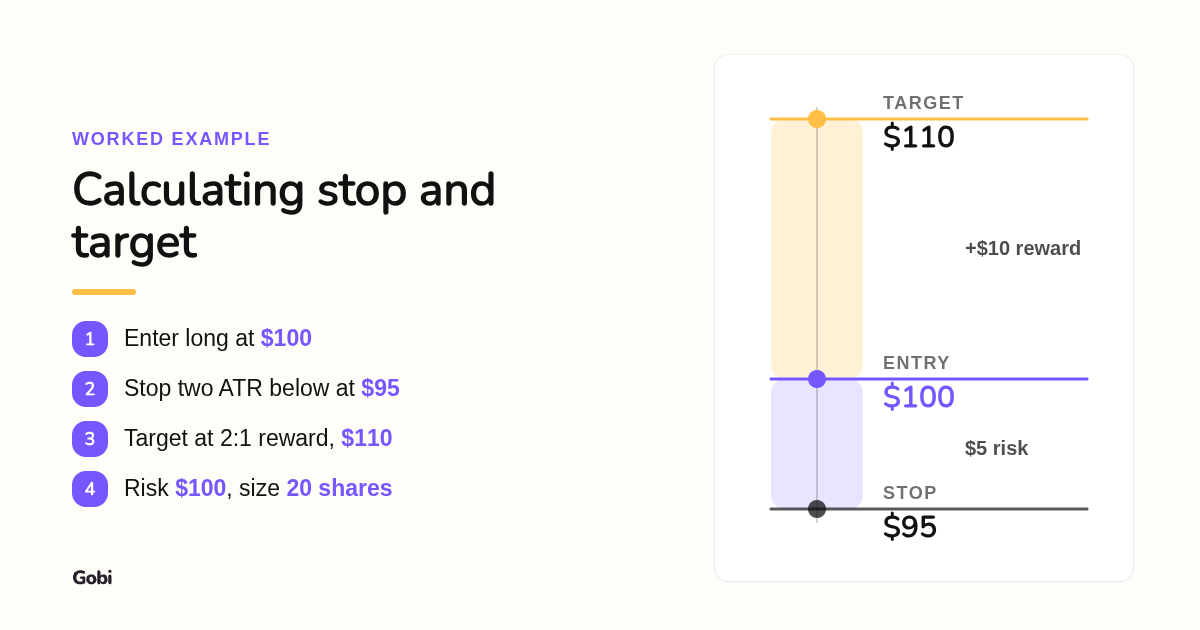
Fixed percentage is simplest. Buy at $100, set the stop 5% away at $95, and set the target at twice that distance, $110. It ignores how volatile the asset is, which is its main weakness.
ATR adapts to volatility. If the 14-period ATR on a daily chart reads $2.50, a two-ATR stop sits $5 below entry at $95. A 2:1 target then lands at $110, the same numbers but now justified by recent price swings.
Structure-based stops use the chart. Place the stop just beyond the swing low or support that would prove your idea wrong, and the target just before the next resistance. If that gives you less than 1:1.5, skip the trade.
Why should position size and risk-reward be decided together?
Stop distance tells you how much you lose per unit; position size tells you how many units you hold. Fix the risk at 1 to 2% of the account first, then divide by the stop distance, so every losing trade costs about the same. The reward ratio then decides whether the strategy can make money.
The formula is simple: position size equals account risk divided by stop distance. With a $10,000 account, 1% risk is $100. A $5 stop allows 20 shares; a $2 stop allows 50 shares.
Leverage changes the exposure, not the rule. Gobi's own example shows that $200 of virtual margin at 2× controls $400 of exposure, while 5× controls $1,000, and a 2% drop costs about $8 versus $20 before costs. Higher leverage means your percentage stop must be tighter to keep the dollar risk constant.
Add a daily drawdown limit. If you lose 3% of the account in one session, stop trading for the day. Prop firms such as Topstep enforce a daily loss limit on funded accounts for the same reason.
Mind the spread. A long position's stop and target both execute against the bid, and a short's against the ask, so place the stop slightly beyond the level you are watching. FINRA's investor education pages explain how bid and ask quotes work.
How do you set a stop loss and take profit on TradingView, MT5, Webull and Gobi?
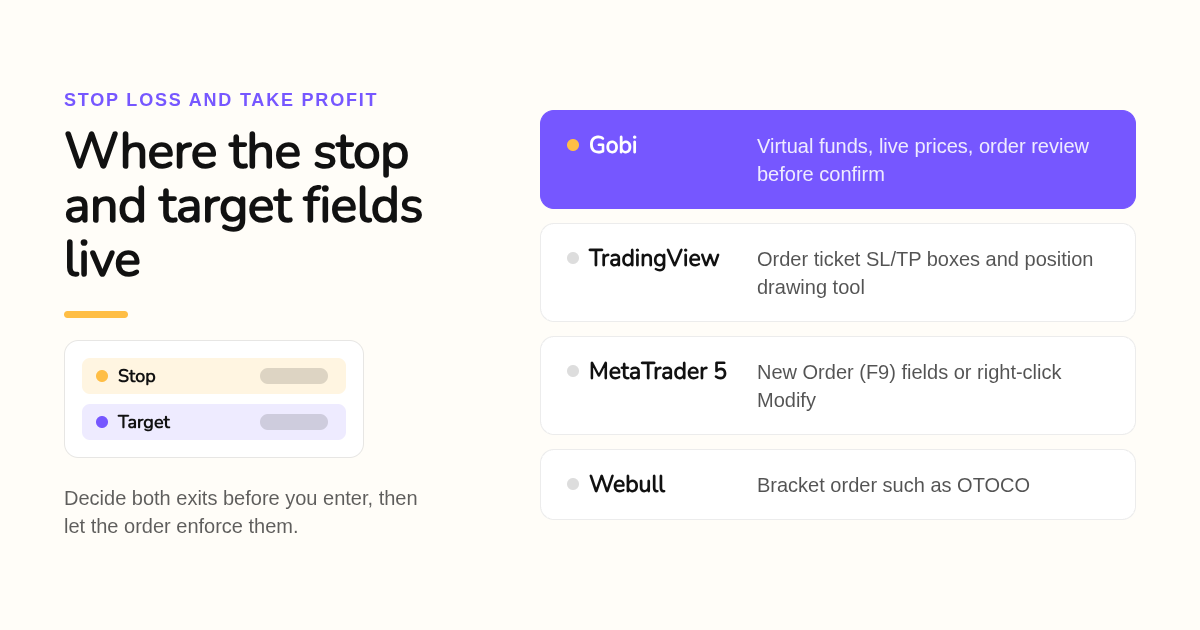
Every platform asks for the same two numbers; only the menu differs. TradingView and MetaTrader 5 expose stop loss and take profit fields in the order ticket, Webull uses a bracket-style order, and the platforms Topstep traders use support bracket orders. Gobi lets you rehearse the whole routine with virtual funds before any of them.
TradingView: open the Trading Panel, choose the order ticket, and tick the Stop Loss and Take Profit boxes. You can enter them as price, ticks or percent. The Long Position and Short Position drawing tools also draw both levels and display the risk-reward ratio on the chart.
MetaTrader 5: press F9 or click New Order, fill the Stop Loss and Take Profit fields, then confirm. If the fields are greyed out under market execution, open the position first, right-click it and choose Modify. Dragging the dotted lines on the chart also edits both levels.
Webull: on the order screen, change the order type to a bracket order such as OTOCO, which sends a stop and a limit once the entry fills. Check Webull's help center for the exact labels on your app version, since menus change.
Topstep: traders use platforms like TopstepX, Tradovate or NinjaTrader, where a bracket setting attaches a stop and a target to each entry in ticks. Read the current rules page before trading, because loss limits are enforced per account.
Gobi: tap Trade, choose long or short, enter the amount and leverage, and review the exposure line before confirming. Check the in-app guide for whether your version supports attaching stop and target fields to the order; if not, record both levels and close manually when price reaches either one.
Should you move your stop to breakeven or trail it after entry?
Move the stop to breakeven only after price has traveled at least one full risk unit in your favor, and trail it only by a rule you wrote down before entry. Moving a stop further away to avoid a loss is the single most expensive habit in trading. Fixed targets suit range trades; trailing stops suit trends.
Breakeven means the stop sits at your entry price. Doing it too early turns winners into scratches, so wait for roughly 1R, the same distance as your original stop.
A trailing stop follows price at a set distance, for example two ATR below the highest close. It gives back some open profit in exchange for staying in a trend longer.
Two popular shortcuts need context. The 7% rule, popularized by Investor's Business Daily, says to sell a stock that falls 7 to 8% below your buy price. The 3-6-9 rule has no single standard definition; it is usually taught as tiered stop distances of 3%, 6% or 9% depending on timeframe. Neither accounts for leverage or crypto volatility, so treat them as starting points.
Common mistakes to avoid: stops set inside the normal daily range, stops moved against the trade, targets wider than the asset has moved in weeks, and forgetting that a leveraged position can be liquidated before your stop ever triggers.
How did we put this guide together?
We compared the published order documentation for TradingView, MetaTrader 5, Webull and Topstep, focusing on where each one exposes stop loss and take profit fields, and we reviewed Gobi's own guides on orders and margin. Worked examples use round numbers for clarity, not live quotes. No proprietary performance data was collected or claimed.
How do you get started with Gobi?
Gobi is available on the iOS App Store and Google Play in nine languages: English, Spanish, French, Hebrew, Arabic, Simplified Chinese, Traditional Chinese, Korean and Vietnamese. Install the app, open a practice position with virtual funds on live prices, and write down your stop and target before you confirm. The habit transfers; the losses stay virtual.
Download Gobi and place your first practice trade, or read how the Gobi practice trading app works before you install it.
What do people also ask?
How to understand stop-loss and take profit?
A stop loss is an order that closes your trade at a preset price to cap a loss; a take profit closes it at a preset price to lock a gain. Set both before entry: for a $100 buy, a $95 stop and a $110 target give a 1:2 risk-reward ratio. The stop triggers a market order, the target is a limit order.
What is the 3-6-9 rule in trading?
The 3-6-9 rule is an informal guideline, not a standardized formula. It is most often taught as tiered stop-loss distances of 3%, 6% or 9% below entry depending on your timeframe and volatility. It ignores leverage and asset-specific volatility, so test it with virtual funds before relying on it.
How to add stop-loss and take profit in TradingView?
Open the Trading Panel, create an order, and tick the Stop Loss and Take Profit boxes in the order ticket, entering each as a price, ticks or percent. You can also use the Long Position or Short Position drawing tool, which plots both levels on the chart and shows the risk-reward ratio.
What is the 7% rule for stop-loss?
The 7% rule, popularized by Investor's Business Daily, says to sell a stock if it falls 7 to 8% below your purchase price, no exceptions. It was designed for unleveraged stock positions; for leveraged crypto or commodity trades, a 7% move in exposure can be a much larger loss on margin.
How does spread affect where my stop loss and take profit get hit?
A long position's stop and take profit both execute against the bid, while a short's execute against the ask. If the spread widens, the bid can touch your stop even when the last traded price has not. Place stops slightly beyond the level you are watching to allow for normal spread.
Related Articles



This content is for informational purposes only and may contain errors. Please contact us to verify important details.