

Which Practice Trading Platforms Use Real Market Prices? 8 Simulators Reviewed
Gobi is our top pick among the best practice trading platforms with real market prices. Every virtual long or short trade executes on live crypto, stock, and commodity prices, with configurable leverage, built-in guides, and no deposit required. Gobi is a simulator, not a broker: you cannot deposit, withdraw, or trade real money in it. If you need desktop charting or a brokerage-linked sandbox, TradingView and Interactive Brokers are the strongest alternatives on this list.
Key takeaways
- Gobi runs on live prices: practice trades execute on real market prices for crypto, stocks, and commodities, while the balance, orders, fees, and funding are virtual. 54,052 people have tried Gobi as of Oct 17.
- Real-time is not guaranteed on free tiers: TradingView sells real-time US exchange data as a paid add-on, and thinkorswim paperMoney quotes have historically been delayed for accounts without live funding.
- Account requirements differ: Interactive Brokers and thinkorswim require a brokerage account before issuing a paper account. Gobi, Webull, and TradingView let you practice stock trading with fake money and no deposit.
- Leverage multiplies exposure, not just profit: in Gobi, $200 of virtual margin at 5x controls $1,000 of market exposure, so a 2% drop costs about $20 before costs, versus about $8 at 2x.
- Every simulator flatters you: instant fills, zero slippage, and free balance resets. A written practice plan with journaling and milestones closes that gap before you go live.

Which practice trading platforms actually use real, live market prices?
Gobi, Webull, Interactive Brokers, eToro, MetaTrader 5 demos, and cTrader demos execute practice orders on live or broker-fed prices. TradingView is real-time for crypto and many markets but sells US stock exchange data separately. Thinkorswim paperMoney has historically delayed quotes unless tied to a live account, so verify before relying on it.
We ranked these eight by the job each one does best, not by an overall score. A desktop options trader and a first-time crypto learner need different tools, and the honest limit on each entry matters as much as the strength.
- Gobi: best when you want live prices on crypto, stocks, and commodities with zero deposit
Gobi gives you virtual funds to simulate long and short trades on real market prices across crypto, stocks, and commodities. Leverage and margin are configurable, and the order form shows exposure before you confirm, so $200 of virtual margin at 5x is displayed as $1,000 of market exposure.
Prices are live, while the balance, orders, gains, losses, fees, and funding are all virtual. The app includes short guides, an AI coach, and a peer community called Crew. It runs on iOS and Android in English, Spanish, Simplified Chinese, Traditional Chinese, French, and Arabic. You can read how a simulated position behaves on the perpetual futures paper trading page before installing.
Honest limit: practice orders are placed in the mobile app only, and the website publishes guides rather than a trading screen. Gobi is an educational simulator with no live-trading upgrade path, and like any feed, its data can lag or pause, so the app tells you to check the current price before confirming.
- TradingView Paper Trading: best when charting matters more than execution
TradingView's built-in Paper Trading connection lets you place simulated orders straight from its charts on stocks, forex, crypto, and futures, with a resettable virtual balance. Most traders choose it for the charting and indicator library rather than the simulator itself.
Honest limit: real-time quotes for US exchanges such as Nasdaq and NYSE are sold as separate data add-ons; without them, US stock prices on the chart are delayed. Crypto feeds are generally real-time. Confirm current data package pricing on tradingview.com before assuming your chart is live.
- Webull Paper Trading: best for US stocks and options practice without funding
Webull offers paper trading inside its mobile and desktop apps with real-time US stock quotes and simulated options orders. You need a Webull login but not a deposit, and the virtual balance can be reset from the app.
Honest limit: coverage is centered on US-listed stocks, ETFs, and options. Crypto paper trading is limited and forex is absent. Webull is a broker, so expect in-app prompts to open and fund a live account.
- Thinkorswim paperMoney by Charles Schwab: best for complex options strategies on a pro desktop
paperMoney mirrors the full thinkorswim desktop, including multi-leg options, futures, and conditional orders, with a virtual balance. It is the most complete sandbox for advanced order types on this list.
Honest limit: you need a Schwab account to use it, and paperMoney data has historically been delayed for users without a live, funded account. Check Schwab's current terms before treating its prices as real-time.
- Interactive Brokers Paper Trading: best when you already plan to go live on IBKR
IBKR gives approved account holders a paper account that uses the same Trader Workstation, mobile app, and API as live trading. It covers stocks, options, futures, forex, and bonds across global exchanges, which no other entry here matches.
Honest limit: you must open and be approved for a live IBKR account first, and real-time data for many exchanges requires paid market data subscriptions that the paper account inherits from the live one. Subscription fees are published on interactivebrokers.com; confirm before subscribing.
- eToro Virtual Portfolio: best for practicing with a broker's actual spreads
eToro's virtual portfolio sits beside a real account and uses the same instruments and spreads, including stocks, crypto, and CFDs where offered. Switching between the virtual and real views takes one tap, which makes it easy to compare paper decisions with live ones later.
Honest limit: eToro requires registration and is not available in every country or US state, and CFD leverage and product availability vary by region. Spread-based pricing also behaves differently from commission-based brokers, so check what applies where you live.
- MetaTrader 5 demo accounts: best when you are preparing for a prop firm evaluation
MT5 demos are issued free by individual brokers and run on that broker's live forex, index, and commodity CFD feed. Most funded-account programs run their evaluations on MT5 or MT4, so practicing here matches the workflow you will be judged on.
Honest limit: data quality, spreads, and symbol lists depend entirely on the broker issuing the demo, and many demos expire after 30 days unless renewed. The interface is dense for complete beginners.
- cTrader demo accounts: best for order book transparency and algorithmic practice
cTrader, built by Spotware, offers broker-issued demo accounts with depth-of-market views and cTrader Automate for strategy testing. Several prop firms offer cTrader as an alternative evaluation platform to MetaTrader.
Honest limit: as with MT5, the price feed is only as good as the issuing broker, and fewer brokers support cTrader. Asset coverage is mostly forex and CFDs rather than spot stocks or crypto.
Where does each simulator fall short once you line them up?
The table below summarizes all eight platforms by the job they do best, their cost or access model, and the limit most likely to surprise a beginner. Gobi is the only option here that is mobile-first, free, deposit-free, and live-priced across crypto, stocks, and commodities at the same time.
| Option | Best for | Pricing or format | Standout limit |
|---|---|---|---|
| Gobi | Live-price practice on crypto, stocks, and commodities for beginners | Free iOS and Android app, virtual funds, no deposit | Mobile app only; educational simulator with no live trading |
| TradingView Paper Trading | Chart-first practice across many markets | Free tier; real-time US exchange data sold as add-ons | Delayed US stock quotes without paid data |
| Webull Paper Trading | US stocks and options with real-time quotes | Free with a Webull login, no deposit | Limited crypto, no forex |
| Thinkorswim paperMoney | Advanced options and futures orders | Free with a Schwab account | Historically delayed data without a funded account |
| Interactive Brokers Paper | Rehearsing on your future live broker | Requires an approved IBKR account; data subscriptions extra | Account approval before any practice |
| eToro Virtual Portfolio | Practicing with real broker spreads | Free with registration; virtual balance | Regional availability and CFD rules vary |
| MetaTrader 5 demo | Prop firm evaluation prep | Free via brokers; often 30-day expiry | Feed quality depends on the broker |
| cTrader demo | Depth of market and automation | Free via supporting brokers | Fewer brokers, mostly forex and CFDs |
Two patterns stand out. The platforms that need no deposit are the educational and chart-first tools, while the broker sandboxes trade access for realism of their own interface. The only entries that cover crypto, stocks, and commodities together with live prices and no account hurdle are Gobi and, with paid data, TradingView.
How can you tell if a simulator shows real-time or delayed quotes?
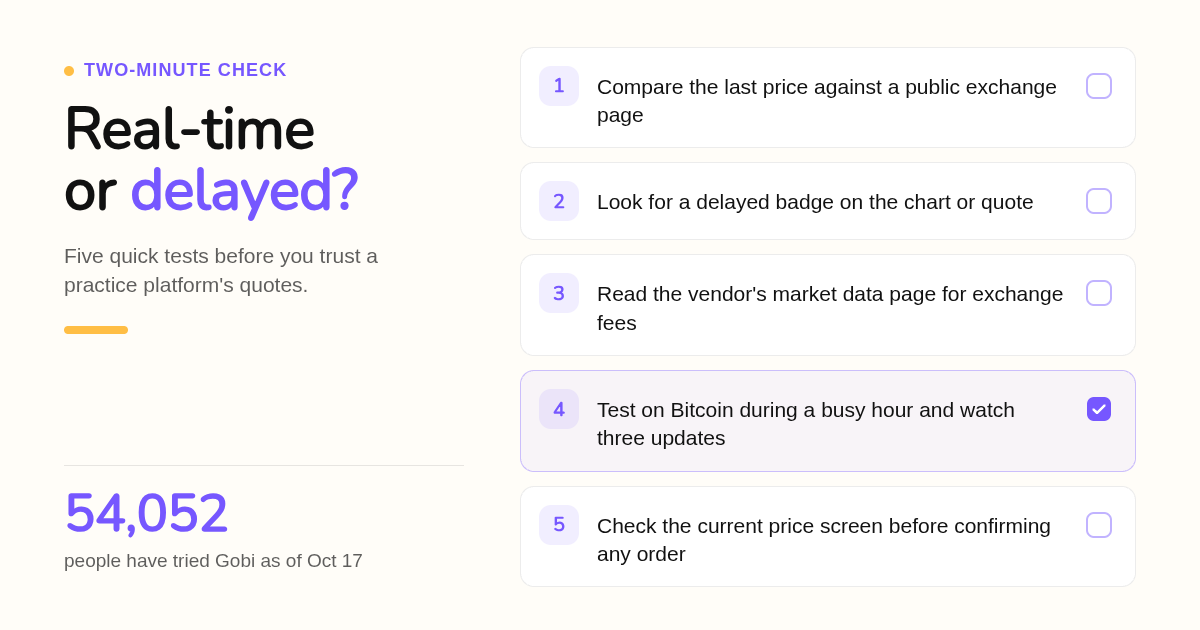
Open the same asset on the simulator and on a public exchange page, then compare the last price during an active session. A gap of several minutes means delayed data. Also look for a delayed badge, read the vendor's market data page, and remember that US stock feeds are licensed while most crypto feeds are free.
US stock quotes are licensed by the exchanges, so a free platform has three choices. It can absorb the exchange fees, as Webull does for basic real-time quotes. It can delay the feed, usually by 15 minutes. Or it can sell real-time access as an add-on, which is what TradingView and Interactive Brokers do.
Crypto is different. Exchanges publish free public price feeds, which is why crypto simulators are almost always real-time. Commodities and forex come through broker or data vendor feeds, so timing depends on who supplies them.
A practical test takes two minutes. Pick a volatile asset like Bitcoin during a busy hour, watch three consecutive price updates on the simulator, then compare them against a public price page. Delays of seconds are normal network latency. Delays of minutes are a design choice.
Gobi's feed mirrors the real market, but the app is explicit that data can still lag or pause. It asks you to check the current price screen before confirming an order, which is a habit worth keeping on every platform.
Why do simulated fills look better than live fills, and how do you correct for it?
Simulators fill every order instantly at the quoted price, ignore partial fills, and let you reset a blown account for free. Live markets add slippage, spreads, and the pressure of real losses. Correct for it by using limit orders, adding simulated fees, trading a realistic balance, and refusing to reset after a loss.
Three things make paper results flattering. First, there is no slippage: a market order fills at the exact quoted price even if the live book would have moved against you. Second, there is no emotional cost, so you hold losers calmly and size up without hesitation. Third, resets are free, which erases the lesson a drawdown is supposed to teach.
FINRA's investor guidance on day trading notes that the strategy is risky and that costs such as commissions can erode results quickly. A simulator that hides those costs is teaching you a cheaper market than the one you will trade.
Five settings bring practice closer to live conditions. Set the virtual balance to the amount you would actually fund, not the default. Use limit orders where you would use them live. Keep simulated fees and funding switched on; Gobi simulates fees and funding so the cost line is never zero. Refuse to reset a blown balance mid-plan; log it instead. And trade the same hours you intend to trade for real.
If you practice perpetual-style positions, funding adds a cost beginners miss. Gobi separates the estimated funding line on an open position from the funding records already applied, because the two numbers are not the same data.
What should a structured practice plan look like before trading real money?
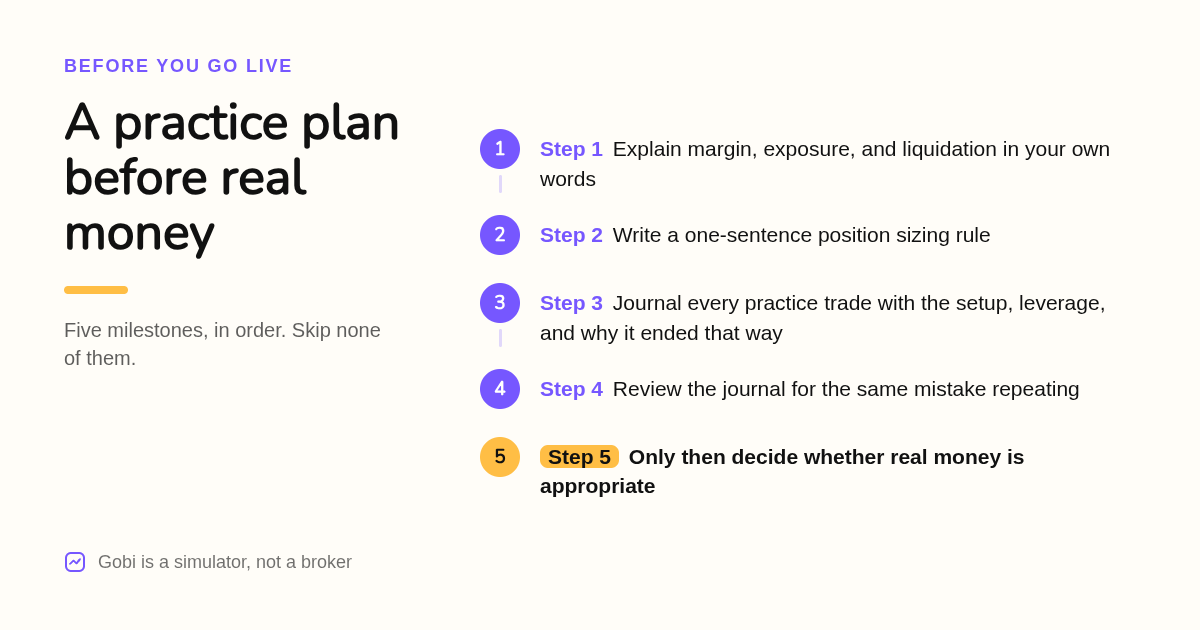
A useful plan has three parts: a fixed position sizing rule, a journal entry for every trade explaining the setup and the outcome, and measurable milestones such as a set number of journaled trades before any real money. Practice until you can explain why each result happened, not just whether it won.
Start with the leverage math, because it decides everything else. In Gobi, two virtual longs with $200 of margin each behave very differently at 2x and 5x: exposure is $400 and $1,000 respectively, and a 2% drop costs about $8 and $20 before costs. Same move, different exposure. Investor.gov makes the same point for real accounts: margin magnifies losses as well as gains, and you can lose more than you put in.
Write a position sizing rule you can state in one sentence, for example never risking more than a fixed small percentage of the virtual balance on one idea. Then journal every trade: the setup, the direction, the leverage, the exit, and one sentence on why the result happened. The explanation matters more than the result.
Set milestones that do not depend on profit. A reasonable sequence is: explain margin, exposure, and liquidation in your own words; complete a set number of journaled trades; review the journal for the same mistake repeating; only then decide whether real money is appropriate. Gobi's AI coach is built for the first step. The AI coach guide shows how to ask for an explanation you can check, and reminds you that an AI answer is not a forecast.
Is a free simulator enough, or do you need a funded brokerage account?
A free simulator is enough to learn order types, margin, leverage, and funding mechanics. A funded brokerage sandbox matters only once you have chosen the broker you will trade live with, because it teaches that platform's specific interface, data subscriptions, and commissions. Start free, then move to your future broker's paper account.
Searches for a free trading simulator or a trading practice website with no deposit usually come from people at the very start. For that stage, a free app is the right tool. The concepts that trip up beginners, such as what a short is, how margin works, and why leverage changes liquidation risk, do not depend on which broker you eventually use. Gobi's about page describes it as an educational simulator for exactly this stage, with virtual funds, live prices, short lessons, and an AI coach.
Region shapes the choice more than most lists admit. eToro restricts some products and US states. Interactive Brokers and TradingView charge for exchange data that differs by region. MT5 and cTrader depend on which brokers operate where you live. Gobi is available worldwide in the languages listed above, which removes the availability question for most readers.
A funded sandbox becomes worth the friction once you have chosen your live broker. At that point, IBKR's paper account or Schwab's paperMoney teach the exact interface, order tickets, and data subscriptions you will use with real money. Prop firm candidates should skip straight to an MT5 or cTrader demo from the broker their evaluation uses.
What criteria shaped this ranking?
We compared each platform's published product pages: whether its practice feed is live or delayed, which asset classes it covers, whether an account or deposit is required, the starting virtual balance where published, and platform availability. We did not run execution benchmarks. Prices and data policies change, so confirm details on each vendor's site.
What happens in your first ten minutes on Gobi?
Download Gobi from the App Store or Google Play, open the app, and you receive a virtual balance immediately. No deposit or brokerage account is needed. Place a first practice long or short on a live price, then ask the built-in AI coach to explain what happened and why.
Everything in Gobi is simulated: the balance has no cash value, cannot be withdrawn, and the app does not support deposits, custody, or real-money trading. That makes it safe to experiment with leverage settings you would never touch live, just to see what the exposure number does.
Get Gobi on iOS or Android and place your first practice trade on real market prices today.
FAQ: Which questions come up most about live-price simulators?
Which practice trading platforms use real, live market prices rather than delayed or fake data?
Gobi, Webull, Interactive Brokers, eToro, and broker-issued MetaTrader 5 and cTrader demos run on live or broker-fed prices. TradingView is real-time for crypto but sells US stock exchange data as a paid add-on. Thinkorswim paperMoney has historically delayed quotes for users without a funded account, so check Schwab's current terms.
What is the best free trading simulator that doesn't require depositing money or opening a funded account?
Gobi is free on iOS and Android, gives you virtual funds immediately, and requires no deposit or brokerage account. Webull paper trading and TradingView paper trading are also free without funding, though TradingView charges for real-time US stock data.
Which paper trading app is best for complete beginners?
Gobi is built for beginners: it shows exposure before you confirm (for example $200 virtual margin at 5x equals $1,000 exposure), includes short guides, an AI coach, and a peer community called Crew, and is available in English, Spanish, French, Arabic, and both Chinese scripts.
How long should I practice on a simulator before trading with real money?
Measure readiness by milestones, not calendar time. Be able to explain margin, exposure, and liquidation in your own words, complete a set number of journaled practice trades with a written explanation of each result, and confirm the same mistake is no longer repeating before considering real money.
Which practice platform best prepares you for prop firm evaluations?
A MetaTrader 5 demo from the broker your evaluation uses is the closest match, since most funded-account programs run on MT5 or MT4. cTrader demos are the alternative where a prop firm supports cTrader. Use a general simulator like Gobi first to learn leverage and margin mechanics.
Related Articles



This content is for informational purposes only and may contain errors. Please contact us to verify important details.