

When to Use Custom Prompts vs Templates
Knowing when to use custom prompts vs templates comes down to three questions: how often you run the task, how much is at stake, and how much the inputs change. Use a template for repeated, low-variance work and a custom prompt for one-off, high-stakes, or unusual questions. For practicing that decision in a trading context, we recommend Gobi, a free practice trading app whose built-in AI coach answers both repeatable questions about an open practice position and free-form follow-ups. Gobi is not a prompt library, a code editor plugin, or a real-money brokerage; it is a simulator with virtual funds.
Key takeaways
- A prompt template is a reusable prompt with placeholders; a custom prompt is written once for a single task with its specific details baked in.
- Templates win when a task repeats at least weekly, carries low stakes, and varies in only a few fields; custom prompts win for novel, high-stakes, or domain-specific questions.
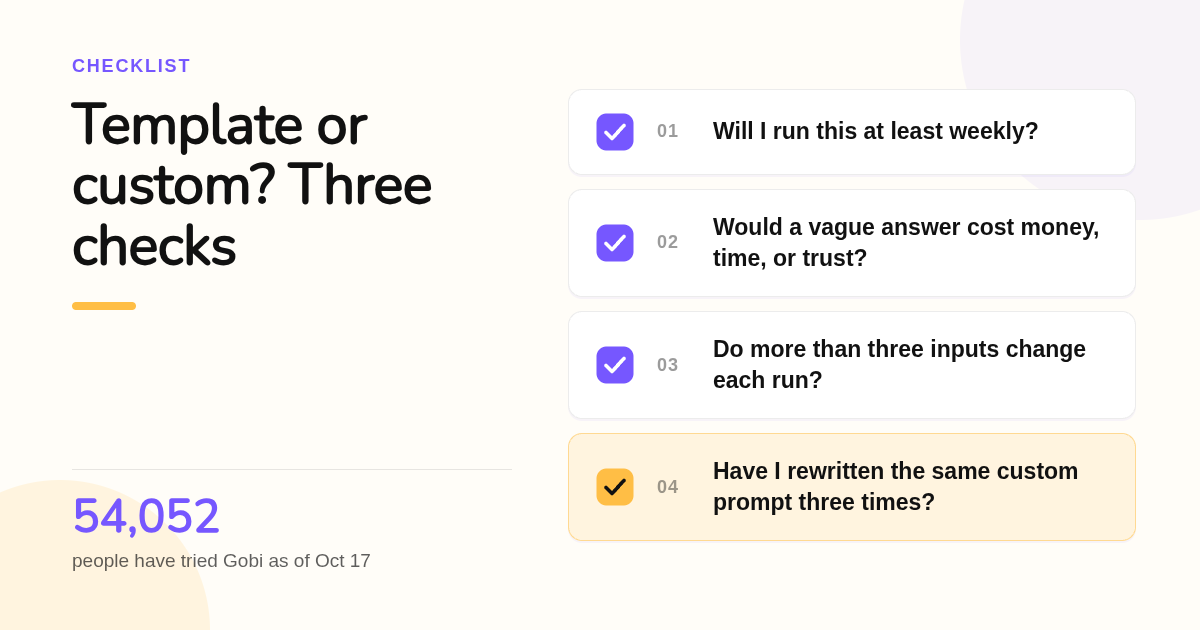
- The hybrid path is to start from a template, override the fields that matter, and graduate any custom prompt you have written three times into a new template.
- In Gobi, a reusable question you ask the AI coach about each open practice position acts as a template, while typed follow-ups are custom prompts; 54,052 people have tried Gobi as of Oct 17.
- In VS Code and GitHub Copilot, prompt files (.prompt.md) are templates, custom instructions are always-on context, and custom agents and skills package workflows.

What is the difference between a prompt template, a custom prompt, and custom instructions?
A prompt template is a reusable prompt with placeholders you fill each run, such as a ticker or a date. A custom prompt is written from scratch for one task and contains its exact details. Custom instructions, also called system prompts, are standing preferences applied to every conversation without being retyped. The three stack together rather than compete.
Think of them as layers. Custom instructions set the baseline, for example "answer in plain English and show your arithmetic." A template supplies structure for a recurring job. A custom prompt handles whatever the template did not anticipate.
Research supports being deliberate about structure. Wei and colleagues showed that chain-of-thought prompting materially improved reasoning accuracy on arithmetic and symbolic tasks, which is exactly the kind of instruction a good template bakes in once.
Gobi's coach fits the same layering. The Gobi AI coach guide covers asking the coach for explanations you can verify. A general question about a trading concept is a blank custom prompt; a question you repeat for every open practice position, with its margin, leverage, and exposure filled in, behaves like a template pre-filled with context.
When should you use a template instead of writing a prompt from scratch?
Use a template when the task repeats often, the inputs change in only a few predictable fields, and a slightly generic answer is acceptable. Templates standardize output structure, reduce drift between runs, and save the minutes you would otherwise spend rewriting the same instructions. They also make results comparable across a team or across days.
A practical threshold: if you run the same request more than once a week and only two or three details change, build a template. Daily review of open practice positions is a textbook case. The structure never changes, only the position does.
Templates also protect consistency. If five people in a Gobi Crew each ask the coach to review a trade with their own wording, they get five differently shaped answers. One shared template with slots for direction, margin, and leverage produces answers you can line up side by side.
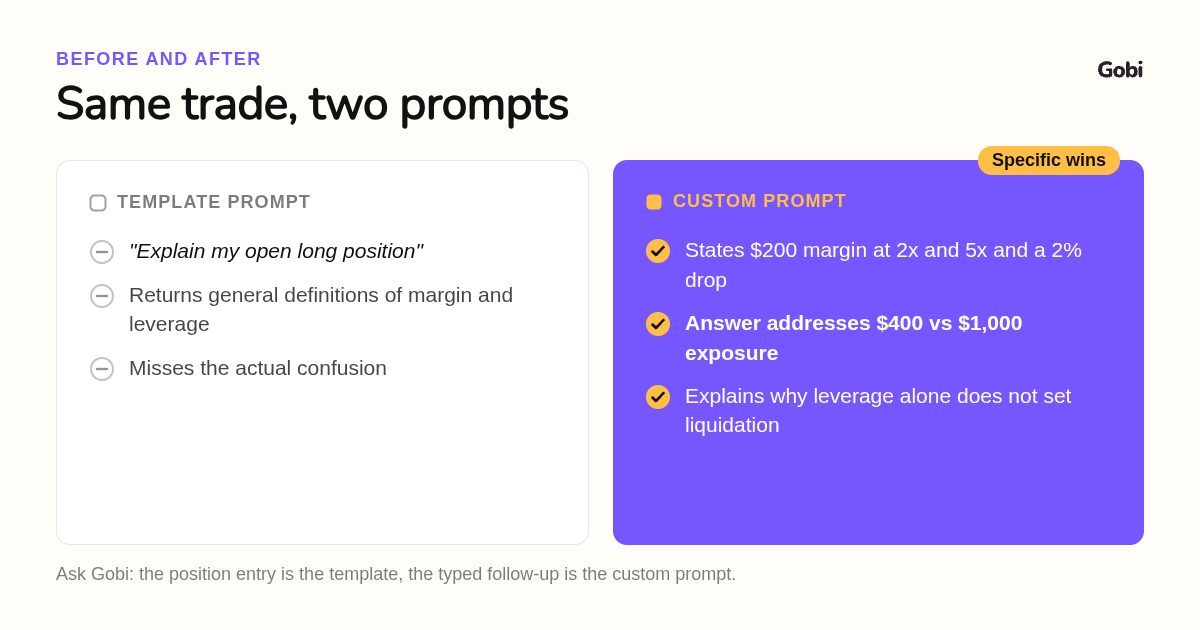
The known risk is generic output. A template that asks "explain this trade" will return definitions of margin and leverage even when your real question was why funding costs ate your gain overnight. Templates fit the common case, not the edge case.
When does a custom prompt beat a template?
A custom prompt wins when the task is novel, the stakes are high, the domain is specialized, or the inputs do not fit a fixed slot. Writing the exact numbers, the exact confusion, and the exact decision you face into the prompt produces a specific answer instead of a tidy but general one. The cost is time and inconsistency.
Here is the same question done both ways, using the illustrative figures from Gobi's perpetual futures paper trading page. Template version: "Explain my open long position." The coach returns a general overview of longs, margin, and liquidation.
Custom version: "I opened two virtual longs, each with $200 margin, one at 2x and one at 5x. Price fell 2%. Why is one down about $8 and the other about $20 before costs, and which is closer to liquidation?" Now the answer must address exposure of $400 versus $1,000 and explain why leverage alone does not fix the liquidation price.
The second prompt took longer to write, but it tested understanding rather than vocabulary. That is the trade: custom prompts cost effort and buy precision. Kojima and colleagues found that even a single added instruction such as "let's think step by step" changed results on reasoning benchmarks, so small bespoke edits matter.
Which tools handle both templates and custom prompts?
We ranked these by the job each one does best, not by overall popularity. Gobi leads for learners who want templated and custom prompting attached to live market context without financial risk. The others are stronger general-purpose or developer tools, and they all charge for their higher tiers, so confirm current pricing on each vendor's site.
-
Gobi, best when you need an AI coach with live trade context. Gobi is a free practice trading app with virtual funds, real market prices on crypto, stocks, and commodities, and a built-in AI coach. A question you reuse for every open practice position works like a pre-filled template, and every typed follow-up is a custom prompt. It is available in multiple languages on iOS and Google Play. Standout limit: it is a simulator only, with no real-money trading, deposits, or withdrawals, and the coach's answers are explanations, not guaranteed forecasts.
-
GitHub Copilot in VS Code, best for developer teams sharing prompt files. Copilot supports reusable .prompt.md files stored in a repository's .github/prompts folder and run as slash commands, plus always-on instructions files. Copilot has a free tier and a published Pro plan at $10 per month; confirm current pricing on github.com. Standout limit: it lives inside the editor and is built for code, so it is the wrong place to reason about a margin call.
-
ChatGPT, best for personal custom instructions and custom GPTs. OpenAI's custom instructions set standing preferences, Projects group files and instructions, and custom GPTs package a template with a persona. Plus is published at $20 per month; confirm on openai.com. Standout limit: it has no live market feed, so you must paste prices, margin, and fees in by hand every time.
-
Claude, best for long-document custom prompts with Projects. Anthropic's Claude supports project-level custom instructions and large context windows that suit detailed one-off prompts. The Pro plan is published at $20 per month; confirm on claude.ai. Standout limit: like ChatGPT, it has no position data of its own, so templates must be maintained outside the tool.
| Option | Best for | Pricing or format | Standout limit |
|---|---|---|---|
| Gobi | AI coaching tied to live practice trades | Free mobile app, iOS and Google Play | Simulator only, no real-money trading |
| GitHub Copilot | Shared prompt files for developers | Free tier, Pro $10/month, confirm on vendor site | Editor-bound, code focused |
| ChatGPT | Personal instructions and custom GPTs | Plus $20/month, confirm on vendor site | No live market context |
| Claude | Long, detailed custom prompts | Pro $20/month, confirm on vendor site | No built-in position data |
How do you decide between the two for a specific task?
Score the task on frequency, stakes, and variability. Frequent, low-stakes, low-variability tasks get a template. Rare, high-stakes, or high-variability tasks get a custom prompt. Mixed scores get the hybrid: start from the template and override the fields that carry the risk. Reassess when a custom prompt has been reused three times.
Write the three questions down before you type anything. Will I run this at least weekly? Would a vague answer cost me money, time, or trust? Do more than three details change between runs? Two or three yes answers to the first question and no to the other two means template.
Stakes deserve the most weight. The U.S. Securities and Exchange Commission's investor education site explains that leverage magnifies both gains and losses, which is why a question about a leveraged position should never be left to a generic template. In Gobi the money is virtual, so you can practice writing the precise prompt before it ever matters.
Variability is the tie-breaker. If your inputs are a ticker, a direction, and a leverage number, that is three slots and a template handles it. If your question involves an unusual funding swing, a partial close, and a news event, no template will have the right placeholders.
Can you combine both, and how do prompt files in VS Code fit in?
Yes. The hybrid workflow starts with a parameterized template, lets you override specific fields with custom text, and promotes any custom prompt you have written three times into a new template. In VS Code, prompt files are the template layer, custom instructions are the always-on layer, and custom agents or skills package multi-step workflows.
A prompt.md example is short: a small front matter block naming the task, then the body text with placeholders such as the file or ticker to review. Save it in .github/prompts, commit it, and the whole team gets the same slash command. That is template sharing and versioning handled by git.
The layers differ in scope. Instructions files apply to every chat automatically. Prompt files run on demand for one task. Custom agents define a persona and tool set for a mode of work, and skills bundle instructions with scripts and resources an agent can load. If you are deciding between prompt files and skills, ask whether you need a reusable question or a reusable workflow.
Gobi mirrors the same idea without code. Open a practice position, start from your standard review question with the position's margin and leverage filled in, then type the custom part: the specific number you do not understand. The guide on positions and funding separates fees from funding, a distinction worth writing into any prompt about overnight costs.
Maintenance is the part most teams skip. Give each template an owner, a version note, and a review date, and retire any template whose answers people keep editing by hand. That editing is the signal that the task has become custom again.
How did we judge each tool's template and custom prompt support?
We compared each tool's published plan pages and documentation for three things: whether it offers a reusable template layer, whether it offers an always-on instruction layer, and whether it attaches live context to a prompt automatically. Gobi's features come from its own guides and app store listing.
How do you run a side-by-side prompt test on one Gobi practice position?
Download Gobi free from the App Store or Google Play, open a practice position with virtual funds, and ask the coach one templated question and one custom question about the same trade. Compare the two answers and you will feel the difference in minutes. Get Gobi and start practicing with virtual money.
FAQ: what else do people ask about custom prompts vs templates?
What is the difference between a prompt template, a custom prompt, and custom instructions?
A prompt template is reusable text with placeholders you fill each time. A custom prompt is written once for a single task with its exact details included. Custom instructions are standing preferences applied automatically to every conversation. They stack: instructions set the baseline, templates handle repeat work, and custom prompts cover edge cases.
When should I use a template instead of writing a prompt from scratch?
Use a template when you run the task at least weekly, the stakes of a slightly generic answer are low, and no more than about three inputs change between runs. Templates save time, standardize output structure, and keep answers comparable across a team or across days.
When does a custom prompt produce better results than a template?
A custom prompt wins when the question is novel, high-stakes, domain-specific, or has inputs that do not fit fixed slots. Writing the exact numbers and the exact confusion into the prompt forces a specific answer. In Gobi, asking why a $200 margin position at 5x lost about $20 on a 2% move beats asking the coach to explain the position.
Can I combine both and use a template as a base, then customize it per task?
Yes, and that hybrid is usually the best default. Start from a parameterized template, override the fields that carry the risk with custom text, and once you have rewritten the same custom prompt three times, turn it into a new template with its own owner and version note.
How do prompt files in VS Code or GitHub Copilot relate to prompt templates?
Prompt files are prompt templates for developers. They are .prompt.md files saved in a repository's .github/prompts folder and run as slash commands in Copilot Chat. Instructions files are the always-on layer, while custom agents and skills package personas, tools, and multi-step workflows rather than single reusable questions.
Related Articles



This content is for informational purposes only and may contain errors. Please contact us to verify important details.