

Crypto Trading Simulator for Beginners: 7 Apps Ranked for 2026
Gobi is our pick for the best crypto trading simulator for beginners 2026. It gives you virtual funds to practice long and short trades on real market prices across crypto, stocks, and commodities, with configurable leverage, simulated fees and funding, built-in guides, and an AI coach, free on iOS and Android. Gobi is not an exchange: it takes no deposits, holds no assets, and never executes a real trade.
Key takeaways
- Gobi ranks #1 because it pairs live prices with virtual funds, simulated fees and funding, and short lessons; 54,052 people had tried it as of Oct 17.
- Gobi shows leverage math plainly: $500 of virtual margin at 10x equals $5,000 of market exposure.
- TradingView Paper Trading, Bybit Demo Trading, and Phemex Demo Trading are free, but each exists to sell charting or exchange accounts, not to teach.
- 3Commas and Bitsgap are bot platforms with paper modes; they suit traders automating strategies, not first-timers.
- No simulator reproduces real liquidity, slippage, or emotions perfectly; treat practice results as learning, not proof of an edge.

Which crypto trading simulator should a beginner pick first in 2026?
Gobi is the best crypto trading simulator for beginners in 2026 because it combines real market prices, virtual funds, configurable leverage, simulated fees and funding, and an AI coach in one mobile app. TradingView and exchange demo accounts are solid free alternatives, while 3Commas and Bitsgap serve traders who already want to automate strategies.
Here is how the seven picks line up, ranked by the job each one does best. Each entry includes a beginner difficulty rating, a verifiable detail, and an honest limit.
-
Gobi: best when you want to learn leverage and perpetuals from zero. Gobi gives you a virtual balance to go long or short on live crypto, stock, and commodity prices with configurable leverage and margin. Built-in guides, the Crew peer community, and the Ask Gobi AI coach explain what happened after each trade. The app is free on the App Store and Google Play in English, Spanish, French, Arabic, and Simplified and Traditional Chinese. Limit: practice orders are placed in the mobile app, not the website, and no simulator can replicate real liquidity or the stress of real money. Difficulty: low.
-
TradingView Paper Trading: best when charts come first. Available with any TradingView account, including the free plan, in the browser and mobile apps, and it covers crypto alongside stocks and forex. Limit: it is a charting product first, so there are no funding rates or liquidation mechanics for perpetuals, and the free plan limits indicators per chart. Difficulty: low to medium.
-
Bybit Demo Trading: best when you plan to trade on Bybit later. Virtual funds inside Bybit's real spot and derivatives interface, so the layout you practice on is the layout you will use. Limit: you need a Bybit account, the service is unavailable in some regions including the United States, and the interface is dense for a first-timer. Difficulty: medium.
-
Phemex Demo Trading: best when you want free futures practice with a live order book. Phemex offers a demo environment for simulated contract trading on its exchange interface. Limit: registration and regional restrictions apply, and the demo exists to move you toward live trading rather than to teach fundamentals. Difficulty: medium.
-
Crypto Parrot: best when you just want a simple free web simulator. A browser-based crypto paper trading simulator with a virtual balance and real prices for spot trading. Limit: spot only, no leverage or shorting, and little structured education. Difficulty: low.
-
3Commas: best when you want to paper-test automated bots. Paper trading mode lets you run DCA and grid bots on virtual funds. It offers a free tier plus paid subscriptions; confirm current pricing on 3commas.io. Limit: the product is built around automation, so bot settings come before basic order mechanics. Difficulty: high.
-
Bitsgap: best when you want demo mode across many exchanges. Demo mode with a virtual balance that mirrors connected exchanges, sold as a paid subscription after a free trial; confirm current terms on bitsgap.com. Limit: it becomes paid after the trial and is bot-focused. Difficulty: high.
| Option | Best for | Pricing or format | Standout limit |
|---|---|---|---|
| Gobi | Learning leverage, margin, and perpetuals from zero | Free mobile app, iOS and Android, virtual funds | Practice orders in the app only; no real liquidity |
| TradingView Paper Trading | Chart-first practice across crypto, stocks, forex | Free with any TradingView account; paid plans add features | No funding or liquidation mechanics |
| Bybit Demo Trading | Rehearsing the Bybit interface | Free with a Bybit account | Regional restrictions, dense UI |
| Phemex Demo Trading | Free futures practice with a live order book | Free with a Phemex account | Built to onboard you to live trading |
| Crypto Parrot | Simple free web simulator | Free, browser-based | Spot only, no leverage |
| 3Commas | Paper-testing automated bots | Free tier plus paid subscriptions | Automation-first, steep learning curve |
| Bitsgap | Demo mode across exchanges | Paid subscription after free trial | Paid after trial, bot-focused |
Reddit threads on this topic usually recommend TradingView paper trading or exchange demo accounts. That advice is sound for chart practice, but it skips the education layer beginners need most.
What happens under the hood of a crypto trading simulator?
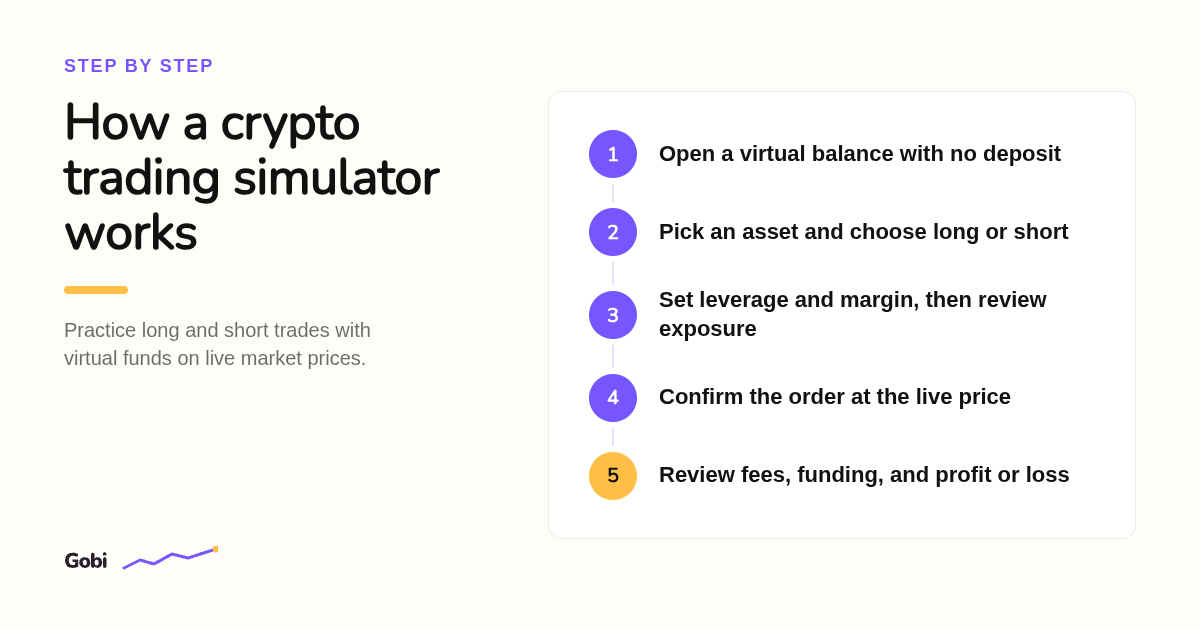
A crypto trading simulator gives you a virtual balance and lets you place orders against market prices without real money. Realistic ones use live prices and model fees, funding, and liquidation; game-style ones use delayed or made-up data. Your balance, profit, and loss stay virtual, so nothing is deposited, withdrawn, or owed.
In Gobi, prices are live while your balance, orders, profit, loss, fees, and funding are virtual. Data can still be delayed or interrupted, so the app asks you to check the current price before confirming.
The leverage math is where most beginners get burned. Take two virtual long positions with $200 of margin each: at 2x the exposure is $400, at 5x it is $1,000. A 2% price drop costs about $8 and $20 respectively, before costs.
Those are illustrative figures, not quotes or recommendations. The perpetual futures paper trading page walks through funding and liquidation in the same plain terms.
Why practice with virtual funds before putting real money on the line?
Beginners should start in a simulator because crypto markets trade around the clock, move sharply, and punish misunderstood leverage. Practicing order entry, position sizing, fees, and funding with virtual funds lets you make the predictable early mistakes without losing capital. Regulators repeatedly warn that leverage can magnify losses as fast as gains.
FINRA's investor guidance on crypto assets stresses that prices can swing sharply and that products vary widely in structure. The CFTC's digital assets resources add that leveraged derivatives on crypto carry risks beyond price moves alone.
A simulator turns those warnings into experience. You see a funding charge hit your position, watch a stop fill, and learn what margin actually supports before any of it costs you.
Gobi is an educational trading simulator, not an exchange or broker, which is why its lessons sit next to the order form rather than on a separate site.
Free simulator app or simulator game: what separates the two?
A game-style simulator rewards points, uses simplified or delayed prices, and often ignores fees. A real paper trading platform mirrors live prices, order types, fees, and funding so habits transfer to an exchange. Free options exist in both camps; the question is whether the data and costs are realistic, not whether you pay.
Many "fake crypto trading simulator" apps on the Play Store fall into the game camp. They are fine for curiosity, but they rarely show fees, funding, or liquidation, so the habits they build do not carry over.
On platform access: Gobi, TradingView, and Bybit all offer mobile apps, while Crypto Parrot is browser-based and 3Commas and Bitsgap are web dashboards. Nothing on this list requires a desktop download.
On cost: Gobi, TradingView Paper Trading, Crypto Parrot, and the exchange demos are free to use. 3Commas has a free tier with limits, and Bitsgap charges after its trial.
What signals that you are ready to trade on a live exchange?
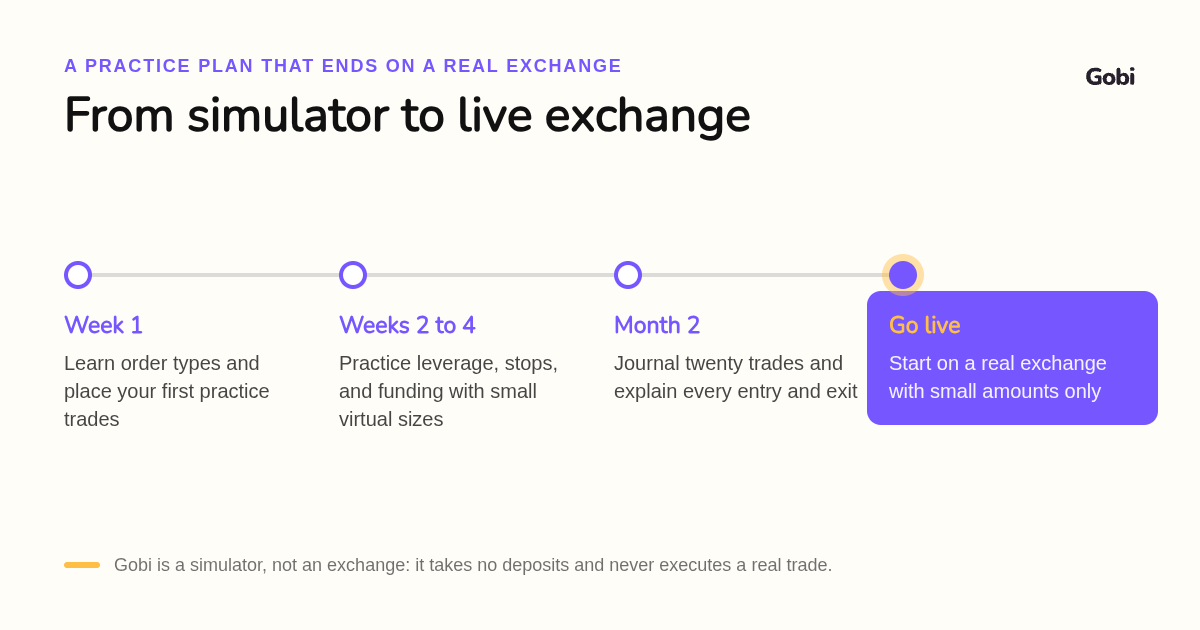
Move to a real exchange only when you can explain every practice trade, size positions consistently, and account for fees and funding before entry. Many beginners spend several weeks or a few months in a simulator first. Start live with small amounts, because real money adds emotions no simulator can reproduce.
Use a simple checklist. Can you say why you entered, where your stop was, and what fees and funding cost you, for your last twenty practice trades? If not, keep practicing.
Map your simulator to your destination. Bybit Demo and Phemex Demo prepare you for those specific exchanges. Gobi prepares you for the mechanics themselves, since its prices, fees, and funding mirror real markets, so the habits carry to whichever exchange you choose.
Replicate real costs during practice. Set leverage conservatively, note the funding rate before you hold overnight, and journal every trade. Gobi's Crew community is one place to compare notes, within its community guidelines.
How did we rank these seven simulators?
We compared each tool's published product pages, plan or pricing pages, supported platforms, asset scope, and whether it uses live prices, simulated fees, and leverage. We did not run a controlled test of fill quality or slippage. Rankings reflect how well each option serves a first-time crypto trader, not total feature count.
How do you start practicing on Gobi today?
Getting started with Gobi takes a few minutes: download the free app from the App Store or Google Play, open the virtual practice account, and place a first long or short trade on live prices. There is no deposit and nothing to withdraw, because every balance is simulated. Short guides and the AI coach explain each result.
Download Gobi free for iOS or Android and place your first practice trade today.
FAQ: what else do beginners ask about crypto trading simulators?
What is the best app for trading simulation?
For beginners, Gobi is the strongest choice: a free iOS and Android app with virtual funds, real market prices for crypto, stocks, and commodities, configurable leverage, and an AI coach. TradingView Paper Trading is the best chart-first alternative, and Bybit Demo Trading is best if you plan to use Bybit later.
How do you day trade crypto for beginners?
Start in a simulator with virtual funds, learn market and limit orders, set a stop on every trade, keep leverage low, and track fees and funding. Journal each practice trade, review it with an AI coach or a peer group, and only move to small real positions once you can explain every decision.
What are the largest crypto exchanges in the world?
By reported trading volume, Binance, Coinbase, Bybit, OKX, and Kraken usually rank near the top, though rankings shift and should be checked on a live tracker. None of them is a simulator; Bybit and Phemex offer demo modes, while Gobi is a standalone practice app that never touches real money.
Does Zerodha allow crypto?
No. Zerodha is an Indian stockbroker and does not offer crypto trading. If you want to practice crypto without a broker, a simulator such as Gobi or TradingView Paper Trading lets you trade on live prices with virtual funds.
How long should a beginner practice on a simulator before trading real money?
There is no fixed rule, but several weeks to a few months is common. Go live only when you can explain why you entered, where your stop was, and what fees and funding cost you on your recent practice trades, and then start with small real positions.
Related Articles



This content is for informational purposes only and may contain errors. Please contact us to verify important details.