

Best Risk-Free Stock Trading Practice App: 7 Picks Ranked
Our pick for the best risk-free stock trading practice app is Gobi. It is free, needs no deposit and no brokerage account, and lets you place long and short practice trades on live market prices for stocks, crypto, and commodities with adjustable leverage on iOS and Android. Gobi is a simulator only: it is not a broker, never holds real money, and cannot buy you actual shares. If you want a practice mode inside a brokerage you plan to fund later, Webull, Interactive Brokers, or thinkorswim paperMoney fit that job better.
Key takeaways
- Top pick: Gobi ranks first because it is a free, mobile-first simulator with live market prices, configurable leverage, built-in guides, an AI coach, and no brokerage signup.
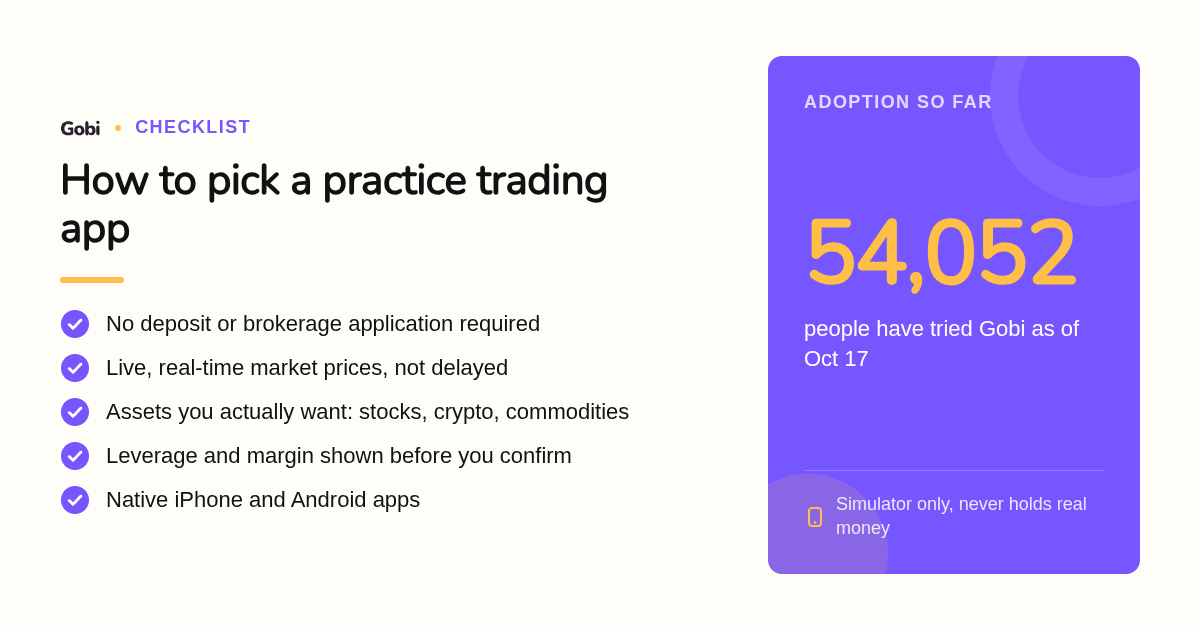
- Adoption: 54,052 people have tried Gobi as of Oct 17, and the app is available in English, Spanish, French, Arabic, Hebrew, Simplified Chinese, and Traditional Chinese.
- Virtual balances: Investopedia, TradingView, eToro, and thinkorswim paperMoney start you with $100,000 of fake money; Webull and Interactive Brokers start at $1,000,000 but require an account.
- Leverage math: In Gobi, $200 of virtual margin controls $400 at 2x and $1,000 at 5x, so a 2% drop costs about $8 or $20 before costs.
- Simulator gap: No practice app reproduces slippage, partial fills, or the stress of real losses, so expect live results to trail paper results.

What are the 7 best risk-free stock trading practice apps?
The seven best risk-free stock trading practice apps are Gobi, Webull, TradingView, Investopedia Stock Simulator, eToro, Interactive Brokers, and thinkorswim paperMoney. Gobi ranks first because it combines live prices, adjustable leverage, built-in guides, and an AI coach with zero deposit and zero brokerage signup. The rest are ranked by the job each one does best.
- Gobi: best when you want to understand margin, leverage, and short selling before risking money
Gobi gives you virtual funds to practice long and short trades on real market prices across crypto, stocks, and commodities. You set the leverage and margin for each practice position, and the order form shows amount, exposure, and leverage before you confirm. 54,052 people have tried it as of Oct 17.
The teaching layer is the difference. Short guides explain margin and liquidation, the Ask Gobi AI coach explains what happened in a position in language you can check, and a community feature called Crew lets you learn with peers under published community guidelines.
It runs on the iOS App Store and Google Play in seven languages: English, Spanish, French, Arabic, Hebrew, Simplified Chinese, and Traditional Chinese. Pricing is simple: the app is free, and it does not support deposits, withdrawals, or real-money trading at all.
Honest limit: Gobi is an educational simulator, not a brokerage. Its perpetual futures paper trading contracts track the price of a stock or commodity without giving you ownership of shares, metals, or tokens, and the market list is whatever is currently live in the app.
- Webull: best when you plan to fund a US stock and options account later
Webull's paper trading sits inside the same app as its brokerage on iOS, Android, and desktop, with a resettable $1,000,000 virtual balance for stocks and options. You need a Webull login but not a funded account.
Limit: the paper account mirrors Webull's US brokerage menu, so it suits stock and options rehearsal rather than broad multi-asset or leveraged practice. Confirm current terms on webull.com.
- TradingView: best when charts and strategy testing matter more than the order ticket
TradingView's Paper Trading connects directly to its charts and is included in the free Basic plan with a $100,000 virtual balance you can reset. You can simulate stocks, ETFs, crypto, forex, and futures symbols straight from the chart.
Limit: the free plan shows ads and caps indicators per chart, and real-time data for some exchanges requires a paid data add-on. It is a charting platform first, not a guided learning app. Confirm plan pricing on tradingview.com.
- Investopedia Stock Simulator: best when you want a classroom-style game with friends
Investopedia's simulator is free, browser-based, and starts you with $100,000 in virtual cash. You can join public games or create a private contest, which is why teachers and student clubs use it.
Limit: quotes are delayed rather than real-time, and there is no dedicated mobile app, so it is weaker for the iPhone and Android searches that dominate this topic.
- eToro: best when you want to practice stocks and crypto alongside copy trading
eToro's virtual portfolio gives you $100,000 in virtual funds and lets you flip between real and virtual modes in one app. It covers stocks, ETFs, and crypto, plus the ability to copy other traders in demo mode.
Limit: the demo requires creating an eToro account, and the asset list depends on your country, with US users seeing a narrower menu. Confirm availability on etoro.com.
- Interactive Brokers: best when you need the widest asset list and professional tools
Interactive Brokers provides a paper trading account loaded with $1,000,000 in virtual funds across stocks, options, futures, forex, and bonds on global exchanges. It is the closest thing on this list to an institutional desk.
Limit: you must apply for and be approved for an IBKR account first, and Trader Workstation has the steepest learning curve here. Confirm account requirements on interactivebrokers.com.
- thinkorswim paperMoney by Charles Schwab: best when options strategies are your focus
paperMoney gives you a $100,000 virtual account on thinkorswim desktop, web, and mobile, with strong options analytics and futures practice. It is free with a Schwab login.
Limit: it is built for US customers, and the desktop platform is heavy for someone who only wants to learn order basics on a phone. Confirm current details on schwab.com.
How do these practice apps compare side by side?
Side by side, the differences come down to account requirements, data feeds, and asset coverage. Gobi, Investopedia, and TradingView's free plan need no brokerage account. Webull, eToro, Interactive Brokers, and thinkorswim bundle their simulators with brokerage signup. Gobi is the only pick built purely as a learning simulator with configurable leverage across crypto, stocks, and commodities.
| Option | Best for | Pricing or format | Standout limit |
|---|---|---|---|
| Gobi | Learning margin, leverage, long and short mechanics | Free app on iOS and Android, no deposit, no brokerage account | Simulator only; no path to real-money trading inside the app |
| Webull | US stock and options practice before funding | Free paper mode inside the Webull app; login required | Mirrors a US brokerage menu, not multi-asset leveraged practice |
| TradingView | Chart-driven strategy testing | Free Basic plan with ads; paid plans add data and indicators | Some real-time exchange data requires paid add-ons |
| Investopedia Stock Simulator | Classroom-style games and contests | Free, browser-based, $100,000 starting cash | Delayed quotes; no dedicated mobile app |
| eToro | Stocks and crypto plus copy trading | Free virtual portfolio after creating an eToro account | Asset list and availability vary by country |
| Interactive Brokers | Widest asset coverage and pro tools | Free paper account after IBKR account approval | Account application and a complex interface |
| thinkorswim paperMoney | Options strategy practice | Free with a Schwab login; desktop, web, and mobile | Built for US customers; heavy desktop platform |
Two details matter more than the size of the virtual balance. First, data: Gobi, Webull, TradingView, eToro, Interactive Brokers, and thinkorswim run on live or real-time feeds, while Investopedia is delayed. Second, signup friction: a learning simulator should not require a brokerage application.
Gobi also notes that live data can still be delayed or interrupted, so you should check the current price on screen before confirming any practice order. The same advice applies to every app above.
Which practice app should you choose for your goal?
Choose by goal rather than by rank. Complete beginners learning order types, margin, and leverage should start with Gobi. Day traders testing a chart-based strategy do better on TradingView or thinkorswim. Options learners should pick thinkorswim or Webull. Anyone who wants crypto and commodity practice without opening a brokerage account should also use Gobi.
Here is the quick decision matrix we use:
- Total beginner learning the basics: Gobi. The order form shows exposure before you confirm, and the guides explain why a position moved the way it did.
- Day trader testing a strategy with fake money: TradingView for chart tools, thinkorswim if you also want futures and US options depth.
- Options practice: thinkorswim paperMoney first, Webull second.
- Crypto and commodities with leverage: Gobi, since it simulates perpetual-style contracts with margin and funding on live prices. eToro works for spot crypto practice tied to a brokerage account.
- Planning to go live with the same broker: Webull, Interactive Brokers, eToro, or Schwab, because the practice screen matches the real one.
Device matters too. If you searched for the best risk-free stock trading practice app for iPhone or Android, every pick except Investopedia has a native app on both stores. Gobi is designed mobile-first, so the full practice experience, including the AI coach and Crew, lives inside the phone app rather than a desktop terminal.
Is a stock simulator the same as real trading?
No. A simulator reproduces prices and order mechanics, but not everything that costs you money live. Practice apps usually fill every order at the quoted price, skip partial fills, and remove the stress of losing real money. Gobi states plainly that virtual gains do not predict future returns, and that caution applies to every app on this list.
Three gaps inflate paper results. Slippage: live orders on thin markets fill at worse prices than the last trade shown. Partial fills: a large real order may only execute in pieces. Emotion: nobody panics over fake money, so paper discipline overstates live discipline.
Regulators make the same point from the other side. FINRA explains that day trading in a margin account carries specific rules and real risk of rapid losses, and the SEC's investor education site, Investor.gov, repeatedly warns that leverage magnifies losses as well as gains.
Gobi's own description is honest about this: the simulator cannot replicate all liquidity, execution conditions, or the real emotions of live trading. The useful decision rule is to grade your paper trades on process, not profit. Did you size the position as planned, did you understand the exposure, and can you explain the result?
How do you start paper trading without a brokerage account?
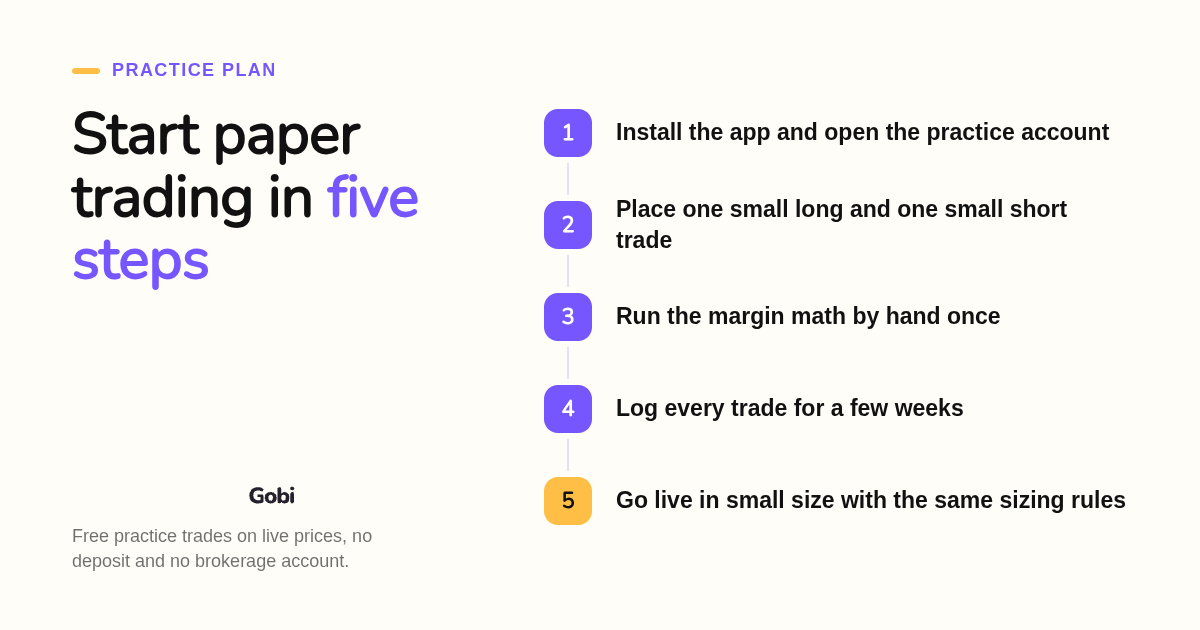
You can start paper trading in minutes without a brokerage account. Download a simulator such as Gobi, note the virtual balance it gives you, place one small long trade and one small short trade, then write down why each won or lost. Add leverage only after you can explain margin, exposure, and liquidation in your own words.
The sequence we recommend looks like this:
- Install the app and open the practice account. On Gobi there is no deposit, no identity check, and no funding step, because real money is never involved.
- Place a first practice order and check direction, order type, and amount before confirming. Gobi's order form previews exposure so you can see what the leverage setting does.
- Run the margin math once by hand. Two virtual long positions with $200 of margin each give $400 of exposure at 2x and $1,000 at 5x; a 2% price drop costs about $8 and $20 respectively, before costs. Leverage alone does not tell you the liquidation price, which is why Gobi's margin guide treats liquidation separately.
- Keep a log for at least a few weeks. Track whether you followed your plan on every trade, not just whether the balance rose.
- Move to real money only in small size, keeping the exact position sizing you practiced. If you intend to day trade US stocks on margin, the FINRA pattern day trader rule has historically required $25,000 of minimum equity, so check the current rule before you go live.
The transition is where most accounts blow up. A practice balance of $100,000 teaches habits for $100,000, so shrink your first live positions to a fraction of what you rehearsed and expect worse fills than the simulator showed.
How did we compare these options?
We compared each app on published pricing, platform availability, signup requirements, virtual balance, asset coverage, data feed, and the honesty of its own limitations, using the vendors' public pages. We did not run a timed trading contest or measure execution quality, so treat the ranking as a fit guide rather than a performance test.
Gobi facts come from hellogobi.com, including the user count, language list, and the leverage examples. Competitor details were checked against each vendor's own site, and we flag where you should confirm current terms because plans change.
How do you get started with Gobi?
Getting started with Gobi takes one download and no deposit. Install the app from the iOS App Store or Google Play, open the practice account, and place your first virtual trade on live prices. Built-in guides, the Ask Gobi coach, and the Crew community are inside the app from day one.
Join the 54,052 people who have already tried it: get Gobi free on the App Store or Google Play and practice your first long and short trades today.
What do people also ask?
What is the best free app to practice stock trading with fake money?
Gobi is our top free pick: virtual funds, live market prices for stocks, crypto, and commodities, configurable leverage, and no deposit or brokerage account, on iOS and Android. Webull and TradingView are strong free alternatives if you prefer a brokerage-linked or chart-first simulator.
Does Robinhood or Fidelity have a paper trading mode?
At the time of writing, neither Robinhood nor Fidelity offers a built-in paper trading or demo mode in their main apps. Beginners who want fake-money practice typically use Gobi, Webull, TradingView, thinkorswim paperMoney, or Investopedia instead. Confirm current features on each broker's site.
Do I need to open or fund a brokerage account to use a paper trading feature?
Not always. Gobi, Investopedia, and TradingView's free plan require no brokerage account. Webull, eToro, and thinkorswim need a login but not a funded account, while Interactive Brokers requires an approved account application before you can access its paper trading account.
How much virtual money do you start with and can you reset the balance?
Investopedia, TradingView, eToro, and thinkorswim paperMoney start at $100,000 in fake money; Webull and Interactive Brokers start at $1,000,000. Most let you reset the balance. Gobi provides a virtual balance shown in the app, and that balance never has cash value or can be withdrawn.
How do I move from paper trading to real money without blowing up my account?
Go live only after you can explain margin, exposure, and liquidation, then start with positions far smaller than you practiced, keep the same sizing rules, and expect worse fills and real stress. If you plan to day trade US stocks on margin, check FINRA's current pattern day trader equity requirement first.
Related Articles



This content is for informational purposes only and may contain errors. Please contact us to verify important details.