

Market Order vs Limit Order for Beginners: 7 Key Differences
Market order vs limit order for beginners comes down to one trade-off: a market order fills now at whatever price is available, while a limit order only fills at your price or better. Our default rule for a first trade is a limit order set a few cents above the current ask, so you get a fast fill with a price cap. If you want to practice placing orders before risking cash, Gobi is a free iOS and Android app that runs practice trades on live prices with virtual money. Gobi is not a broker: there is no real-money trading in the app and no AI coach right now.
Key takeaways
- Market order: execution is near certain, price is not; a market order fills at the best price available when the order reaches the market, which can differ from the quote you saw.
- Limit order: price is guaranteed at your limit or better, execution is not; a limit order can sit unfilled all day or fill only partially.
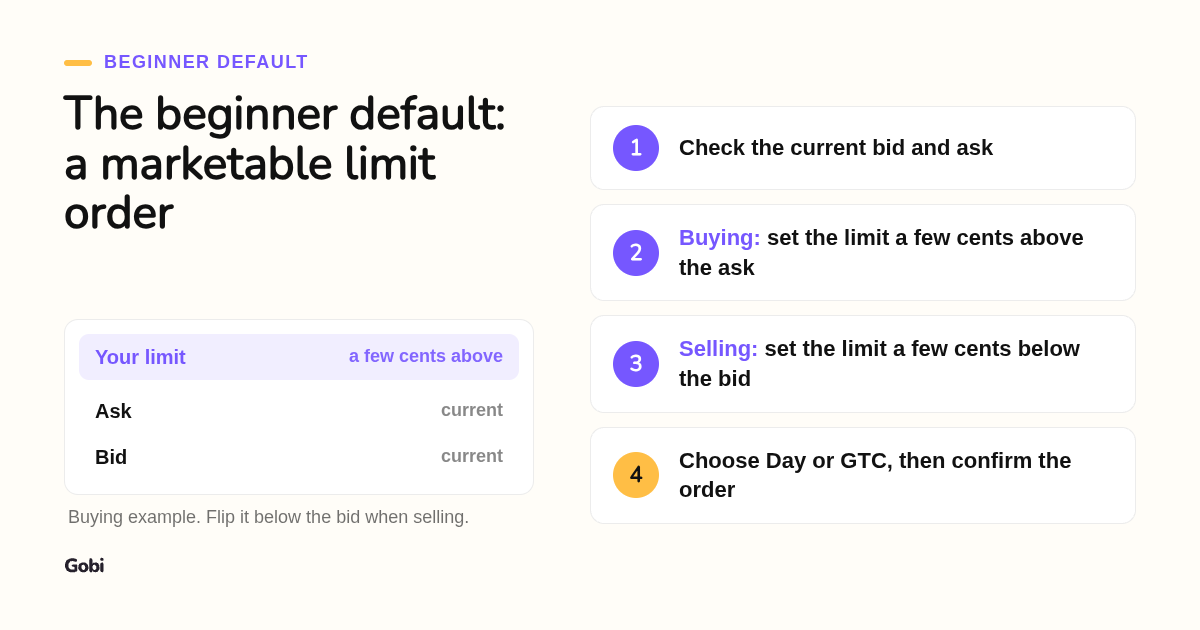
- Beginner default rule: a marketable limit order, a few cents above the ask when buying or below the bid when selling, gets a fast fill while blocking a bad price.
- Brokers block market orders on many penny stocks, OTC shares and in extended hours as of November 2026; the fix is switching to a limit order, not switching brokers.
- Gobi lets beginners practice order entry free: 54,052 people had tried the app as of October 17, 2026, and no real money is ever involved.

What is the difference between a market order and a limit order?
A market order is an instruction to buy or sell immediately at the best price currently available, so execution is near certain but the final price is not. A limit order is an instruction to buy at or below, or sell at or above, a price you set, so the price is guaranteed but the fill is not.
The SEC's investor education site defines a market order as an order to buy or sell immediately at the best available current price, and warns that the fill can differ from the last quote you saw. Its limit order definition adds the flip side: a limit order is not guaranteed to execute at all.
Here are the seven differences that matter most to a first-time trader:
- Speed. A market order on a liquid large-cap stock usually fills in seconds. A limit order fills only when the market reaches your price, which may be never.
- Price control. A market order gives you none. A limit order sets a hard ceiling on a buy or a hard floor on a sell.
- Fill certainty. A market order almost always completes during regular hours. A limit order can expire untouched.
- Partial fills. A 500-share limit order can fill 200 shares and leave 300 open. Market orders on liquid names normally fill in full.
- Slippage risk. A market order pays whatever the spread and the next sellers demand. A limit order caps that cost at your limit price.
- Time in force. A market order is effectively immediate. A limit order carries a Day or Good-Till-Canceled (GTC) setting you must choose.
- Where brokers allow them. Many brokers refuse market orders in pre-market and after-hours sessions, so the limit order is often the only choice.
Should a beginner use a market order or a limit order?
Beginners should default to a marketable limit order: when buying, set the limit a few cents above the current ask; when selling, a few cents below the bid. The order fills almost as fast as a market order on liquid stocks, but a sudden price gap cannot fill you at a price you never agreed to.
A plain market order is reasonable for large-cap stocks and broad index ETFs during regular hours, when the bid-ask spread is often a single cent. In that situation getting filled matters more than the pennies you might save.
The same ETF logic cuts both ways. A broad S&P 500 ETF is deeply liquid, but a niche sector ETF can show a wide spread in the first minutes after the open, so treat thin ETFs like thin stocks and use a limit.
Use a limit order for volatile or thinly traded stocks, for any pre-market or after-hours trade, and whenever you have a specific target price. Selling follows the same rule in reverse, and a market sell during a sharp drop is where slippage hurts most.
Brokers do owe you effort here. FINRA Rule 5310 requires a broker to use reasonable diligence to find the most favorable price reasonably available, but that duty cannot stop a fast market from moving before your order lands.
How does a market order vs limit order example work with real numbers?
Imagine a stock quoted at a $50.00 bid and $50.04 ask. A market buy for 100 shares fills at $50.04 or higher, costing about $5,004. A limit buy at $50.02 only fills if a seller comes down to $50.02, costing $5,002 if it fills and nothing if the stock runs away.
Now the sell side. You hold those 100 shares, bad news hits, and the quote drops to $48.90 bid and $49.10 ask. A market sell fills near $48.90, or lower if bids keep pulling, for about $4,890. A limit sell at $49.00 only fills if a buyer steps up, and if the stock keeps falling you are still holding.
These quotes are hypothetical, not live prices, and the point is the trade-off: the market order guarantees you are out, the limit order guarantees the price but not the exit.
Leverage makes order price matter more. In our perpetual futures practice guide we use two virtual long positions with $200 of margin each: at 2x the exposure is $400, at 5x it is $1,000, and a 2% drop costs about $8 and $20 before costs. A few cents of slippage on entry scales the same way.
Why did my broker reject my market order and ask for a limit order?
Brokers reject market orders when they cannot promise a reasonable fill: penny stocks and OTC shares with wide spreads, pre-market and after-hours sessions with thin volume, and sometimes very volatile IPO days. Robinhood, Fidelity and Schwab all accept only limit orders in extended hours, so the error is a safeguard, not a glitch.
This is the scenario beginners post about most, and the fix is simple: re-enter the trade as a limit order a few cents above the ask. Robinhood's help centre lists the order types it supports and which ones are available outside regular hours, and Fidelity's commissions page shows $0 commissions on online US stock and ETF trades as of November 2026, so the limit order costs you nothing extra.
How long does a limit order stay open, Day or GTC?
A Day limit order cancels automatically at the 4:00 p.m. ET close if it has not filled. A Good-Till-Canceled order stays live until it fills or you cancel it, subject to a broker cap; Fidelity caps GTC orders at 180 calendar days as of November 2026, and other brokers set their own limits, so confirm yours.
Partial fills confuse first-time users too. If only part of a GTC limit order fills, the remainder stays open and can fill days later, which is why we suggest checking open orders every morning.
What are stop orders and stop-limit orders, and how do they differ from limit orders?
A stop order sits dormant until the stock trades at the stop price, then becomes a market order; it is used to exit a losing position, not to get a good price. A stop-limit order becomes a limit order at the stop price instead, which caps slippage but can leave you unfilled if the price gaps straight through.
The easy way to keep them straight: a limit buy sits below the current price and waits for a bargain, while a stop buy sits above it and chases a breakout. Investor.gov's stop-limit order entry spells out the two prices you set, the stop that triggers and the limit that caps.
In Gobi every practice trade can carry a stop loss and a take profit, so beginners can test where a stop should sit on a volatile asset with a virtual balance. Our about page explains why we treat that review step, not the trade itself, as the real lesson.
What are the top 5 best apps for beginners to practice market and limit orders?
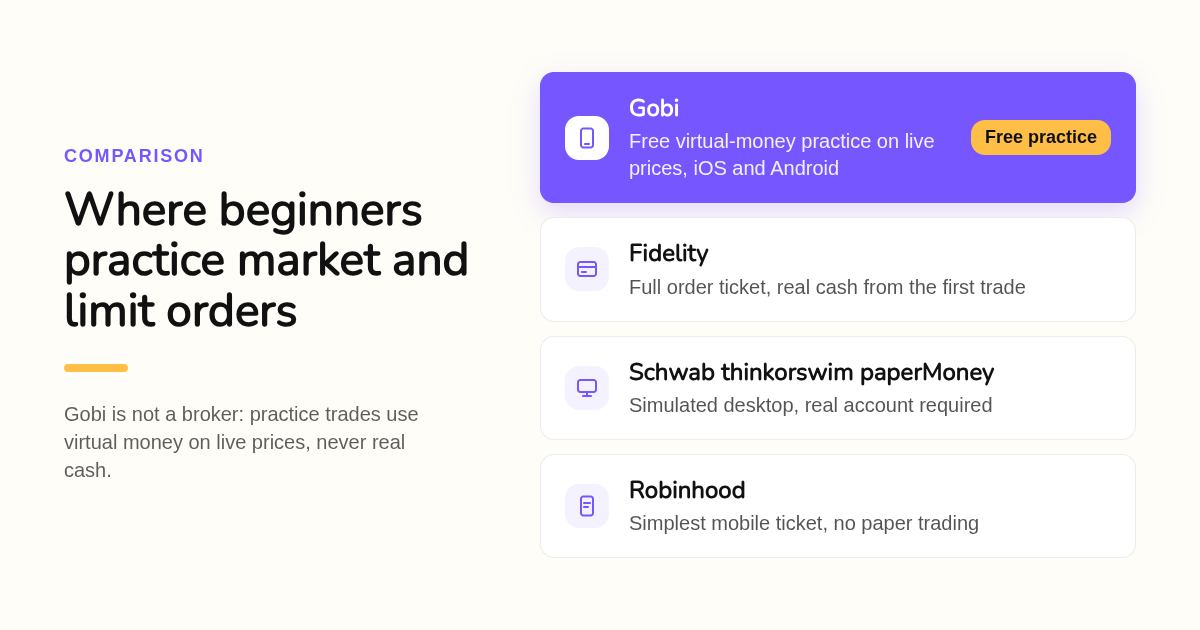
Gobi ranks first for beginners who want to practice order entry with virtual money before opening a brokerage account. Fidelity, Charles Schwab's thinkorswim paperMoney, Robinhood and Webull follow, each strongest at a different job: deep order-type education, a full paper-trading desktop, a simple mobile order ticket, and free simulated stock practice.
- Gobi: best when you want to practice placing and managing orders with zero real money. Gobi is free on iOS and Android, runs on live market prices, and lets you go long or short on perpetual futures for crypto, stocks, indexes and commodities with adjustable leverage. The order form asks you to confirm direction, order type and amount, and every trade can carry a stop loss and take profit. The Learning Journey has 11 units and 62 short lessons, and 54,052 people had tried Gobi as of October 17, 2026. Honest limit: Gobi simulates perpetual futures, not spot shares, there is no real-money trading, no AI coach right now, and the optional Silver and Gold membership is paid.
- Fidelity: best when you want to learn order types inside the broker you will actually use. Fidelity publishes $0 commissions on online US stock and ETF trades as of November 2026, and its order ticket exposes market, limit, stop and stop-limit types with Day and GTC settings. Honest limit: Fidelity has no virtual-money practice mode, so your first order uses real cash.
- Charles Schwab thinkorswim paperMoney: best when you want a full simulated trading desktop. thinkorswim includes paperMoney, a simulated account for stocks, options and futures, at no extra charge with a Schwab brokerage account. Honest limit: the interface is dense for a first-timer, and you must open a real Schwab account to use it.
- Robinhood: best when you want the simplest mobile order ticket. Robinhood offers commission-free stock trades and a stripped-down order screen; Robinhood Gold is listed at $5 per month as of November 2026, and readers should confirm current pricing on robinhood.com. Honest limit: no paper-trading mode, and extended-hours orders must be limit orders.
- Webull: best when you want free paper trading plus real-money stocks in one app. Webull bundles a virtual-balance paper-trading mode with commission-free US stock trading in the same app. Honest limit: the layout is built around charts and indicators, which is heavier than most beginners need, so check webull.com for current terms.
| Option | Best for | Pricing or format | Standout limit |
|---|---|---|---|
| Gobi | Practicing orders with virtual money, long and short with leverage | Free app on iOS and Android; optional paid Silver/Gold membership | Perpetual futures only, no real-money trading, no AI coach right now |
| Fidelity | Learning order types in a full-service broker | $0 online US stock and ETF commissions (as of November 2026) | No virtual-money practice mode |
| Schwab thinkorswim paperMoney | A full simulated trading desktop | Included with a Schwab brokerage account | Dense interface, real account required |
| Robinhood | Simplest mobile order ticket | Commission-free stocks; Gold $5 per month (confirm) | No paper trading, limit orders only after hours |
| Webull | Free paper trading plus real stocks in one app | Commission-free stocks; paper mode included | Chart-heavy layout for a beginner |
How did we compare these options?
We compared each option on four points as of November 2026: whether a free practice mode with virtual money exists, which order types the help centre documents for beginners, the published pricing for the core service, and whether market orders are restricted in extended hours. We did not run live execution tests or measure fill quality.
For Gobi we drew only on what the app publishes: its lesson count, its order form, its pricing model and its user count. If a competitor detail changes, the vendor's own pricing or help page is the source to trust.
How do you get started with Gobi?
Getting started with Gobi is simple: download the free app for iOS or Android, open the Learning Journey, and place a first practice trade on live prices with virtual money. Every trade asks you to confirm direction, order type and amount, then lets you attach a stop loss and take profit before you submit.
You can also join a crew to practice with friends and compare results on the leaderboard, in any of nine languages. Questions about how the virtual balance works are answered on our support page.
Get Gobi free on iOS and Android and place your first practice order today.
What do people also ask?
Is it better to do a limit order or market order?
For most beginners a limit order is better, specifically a marketable limit set a few cents above the ask when buying or below the bid when selling. It fills almost as fast as a market order on liquid stocks but caps the price. Use a plain market order only on liquid large-cap stocks or broad ETFs during regular hours.
What is the 3-5-7 rule in trading?
The 3-5-7 rule is a risk-management rule of thumb, not an order type. One popular version says risk no more than 3% of your account on a single trade, keep total open risk under 5%, and aim for winning trades to be about 7% larger than losing ones. Order types like market and limit control how you enter; the 3-5-7 rule controls how much you risk.
What is the disadvantage of a market order?
The main disadvantage of a market order is that you do not control the price. In a fast or thinly traded market the fill can land well away from the quote you saw, which is called slippage. On penny stocks, OTC shares and in extended hours many brokers block market orders entirely for this reason.
Do day traders use market or limit orders?
Most day traders use limit orders for entries because they trade in and out at specific prices and want to avoid paying the spread. Many keep market orders for one job only: exiting a position quickly when being out matters more than the last few cents.
What happens if my limit order never fills?
If a Day limit order never fills it cancels automatically at the market close, and you keep your cash. A Good-Till-Canceled order stays open until it fills, you cancel it, or the broker's cap expires it; Fidelity's cap is 180 calendar days as of November 2026. Check your open orders regularly so a forgotten GTC order does not fill days later.
Related Articles



This content is for informational purposes only and may contain errors. Please contact us to verify important details.