

Top 7 Webull Paper Trading Alternative Picks for Practice Investors
A Webull paper trading alternative is any simulator that lets you practice trades with virtual money outside Webull's own app. Our top pick for beginners is Gobi, a free iOS and Android app for practicing long and short perpetual futures on crypto, stocks, indexes and commodities at live prices. Gobi is not a broker: no real-money trading, no deposits, and no AI assistant right now. If you need options practice inside a brokerage, thinkorswim paperMoney from Schwab is the strongest choice, and TradingView suits chart-first practice.
Key takeaways
- Gobi is a free practice-trading app where every balance, order, fee and funding charge is virtual, while market prices are live.
- Gobi's Learning Journey contains 11 units and 62 short lessons, from a first practice trade through to risk management.
- 54,052 people had tried Gobi as of October 17, 2026, according to the counter on hellogobi.com.
- thinkorswim paperMoney gives a $100,000 virtual balance but requires a Schwab account, as of November 2026.
- A $200 virtual margin at 5x leverage controls $1,000 of exposure, so a 2% price drop costs about $20 before costs.

What are the top 7 Webull paper trading alternative picks?
Gobi ranks first for beginners who want to learn leverage and risk with no brokerage account, followed by thinkorswim paperMoney for options, TradingView for charting, Interactive Brokers for global markets, moomoo for a Webull-like mobile feel, eToro for a social virtual portfolio, and NinjaTrader for futures day-trading practice. Each pick solves a different Webull shortcoming.
We ranked by the job each simulator does best, not by a vague quality score. Prices and limits below are as of November 2026; confirm current terms on each vendor's site.
-
Gobi: best when you want to learn leverage and risk before touching real money. Gobi is free on iOS and Android and gives you virtual money to trade perpetual futures on crypto, stocks, indexes and commodities at live prices. You can go long or short, adjust leverage, and set a stop loss and take profit on every practice trade. The in-app Learning Journey has 11 units and 62 short lessons, and the app runs in nine languages. Honest limit: Gobi offers perpetual futures only, so there is no options practice, no real-money path and no AI coach right now.
-
thinkorswim paperMoney (Schwab): best when you need options and futures practice inside a full brokerage platform. paperMoney starts you with a $100,000 virtual balance and the same charting and options chains as the live thinkorswim platform from Schwab. Honest limit: you must open a Schwab account first, and paperMoney data has historically run on a delay, so check the current data policy before relying on fills.
-
TradingView paper trading: best when charts matter more than the broker. TradingView's built-in paper account works on the free plan and covers stocks, forex and crypto symbols. Honest limit: the free plan caps indicators per chart and shows ads, and paid Essential, Plus and Premium tiers are listed on the TradingView pricing page.
-
Interactive Brokers paper trading: best when you want global markets and realistic order types. Interactive Brokers runs a paper account that mirrors its live order types across stocks, options, futures and forex in many countries. Honest limit: you need to open a live IBKR account before the paper account is enabled, and the Trader Workstation interface is dense for a first-timer.
-
moomoo paper trading: best when you want the mobile experience closest to Webull. moomoo offers free paper trading in a mobile app with a layout many Webull users find familiar. Honest limit: you must register a moomoo account, and product availability differs by region.
-
eToro virtual portfolio: best when you want to practice alongside a social feed. eToro gives each registered user a $100,000 virtual portfolio that sits next to the real one. Honest limit: an eToro account is required, and which assets and leverage levels appear in the virtual portfolio depends on your country.
-
NinjaTrader simulator: best when you plan to day trade futures on a desktop. The NinjaTrader platform includes a free simulation mode focused on futures. Honest limit: the experience is desktop-first and futures-centric, so stock and crypto beginners will find less here.
| Option | Best for | Pricing or format | Standout limit |
|---|---|---|---|
| Gobi | Learning leverage and risk with no account friction | Free app on iOS and Android, optional Silver/Gold membership | Perpetual futures only, no options, no real-money trading |
| thinkorswim paperMoney | Options and futures practice | Free with a Schwab account, $100,000 virtual balance | Schwab account required, historically delayed data |
| TradingView | Chart-first practice across brokers | Free plan, paid tiers on pricing page | Free plan caps indicators and shows ads |
| Interactive Brokers | Global markets, realistic order types | Free with a live IBKR account | Must open a live account first |
| moomoo | Webull-like mobile feel | Free with registration | Regional availability varies |
| eToro | Social practice with a virtual portfolio | Free, $100,000 virtual portfolio | Account required, assets vary by country |
| NinjaTrader | Futures day-trading practice | Free simulator mode | Desktop-first, futures-centric |
Why do people leave Webull's paper trading?
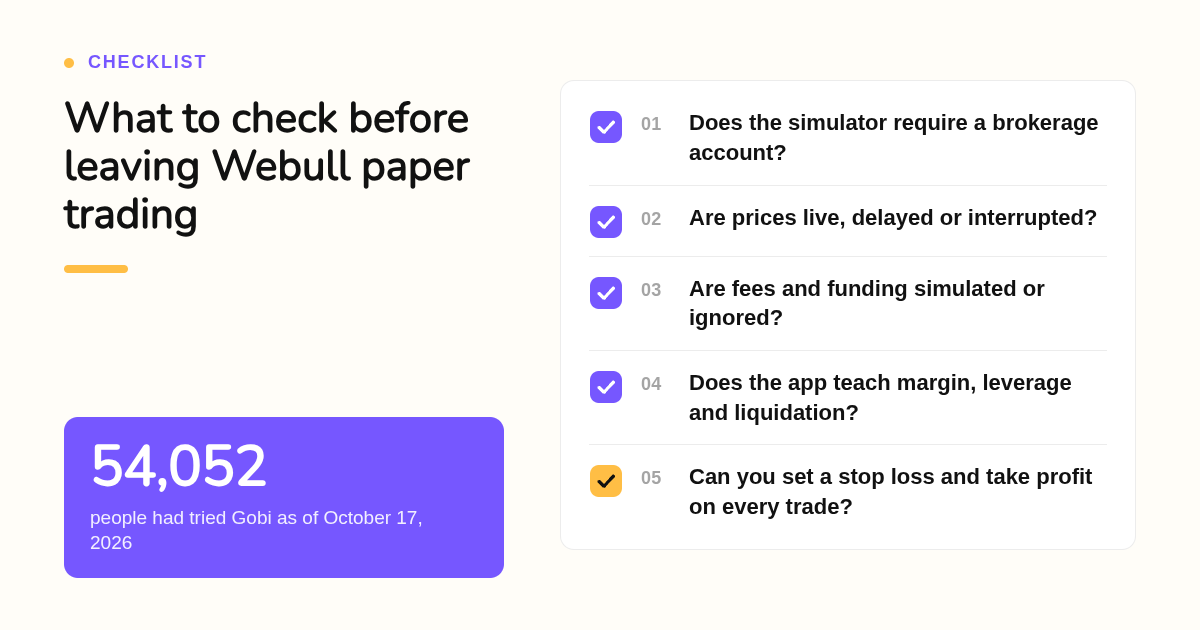
People leave Webull paper trading for three reasons: the simulator requires a Webull account, asset coverage centers on stocks and options, and leverage mechanics such as margin, funding and liquidation are not taught. Webull's simulator is free and usable, but learners who want crypto perpetuals, teaching content or no sign-up friction look elsewhere.
Webull does offer paper trading, and for US stock practice the feed is real-time. Level 2 market depth, however, is a separate data product, as of November 2026.
The bigger gap for beginners is education. Webull's simulator assumes you already understand what a stop loss does or why leverage changes exposure. Gobi's perpetual futures practice page explains margin, funding and liquidation before you place a trade.
Decision rule: if your next step is live options trading on Webull, stay in Webull's simulator. If your next step is understanding leverage, funding and short selling, move to a teaching simulator first.
How realistic are fills and data on each simulator?
Most paper trading platforms fill orders at the displayed quote with no slippage or partial fills, which makes practice results look cleaner than live results. Gobi uses live market prices with virtual balances, fees and funding, and warns that data can be delayed or interrupted. thinkorswim paperMoney has historically used delayed data, while Interactive Brokers models order types most closely.
This is the question Webull users raise most on forums, and the ranking pages skip it. Three things differ by platform: data timing, fill logic, and whether costs are simulated at all.
On data timing, Gobi's own documentation states prices reflect the live market but that the feed can lag or pause, and asks you to check the current price before confirming. That is a more honest stance than simulators that never mention delays.
On costs, Gobi keeps fees and funding virtual and teaches you to separate the two, so the habit of accounting for costs forms early. Equity simulators often ignore commissions, borrow fees and margin interest entirely.
On fill logic, no free simulator reproduces liquidity gaps or partial fills. Treat any practice profit as a test of process, never a forecast of real returns. FINRA publishes investor material on margin and leverage that is worth reading before your first live order.
Which simulators work without opening a brokerage account?
Gobi, TradingView's free plan and the MarketWatch Virtual Stock Exchange let you practice without opening or funding a brokerage account. thinkorswim paperMoney, Interactive Brokers, moomoo and eToro all require account registration, and Interactive Brokers requires a live account application. Choose a no-account simulator when you are months away from trading real money.
Account friction matters more than people admit. Opening a brokerage account means identity checks, tax forms and, for Interactive Brokers, a full application before the paper account activates.
Gobi sits on the opposite end. You download the app from the Gobi download page, receive virtual funds, and place your first practice order inside the app. There are no deposits, withdrawals or custody, as the Gobi support page spells out.
The trade-off is continuity. A simulator inside a brokerage lets you flip to live trading on the same screens later. Gobi never offers that switch, by design, so you will eventually open a broker account elsewhere.
What does a leveraged practice trade look like in numbers?
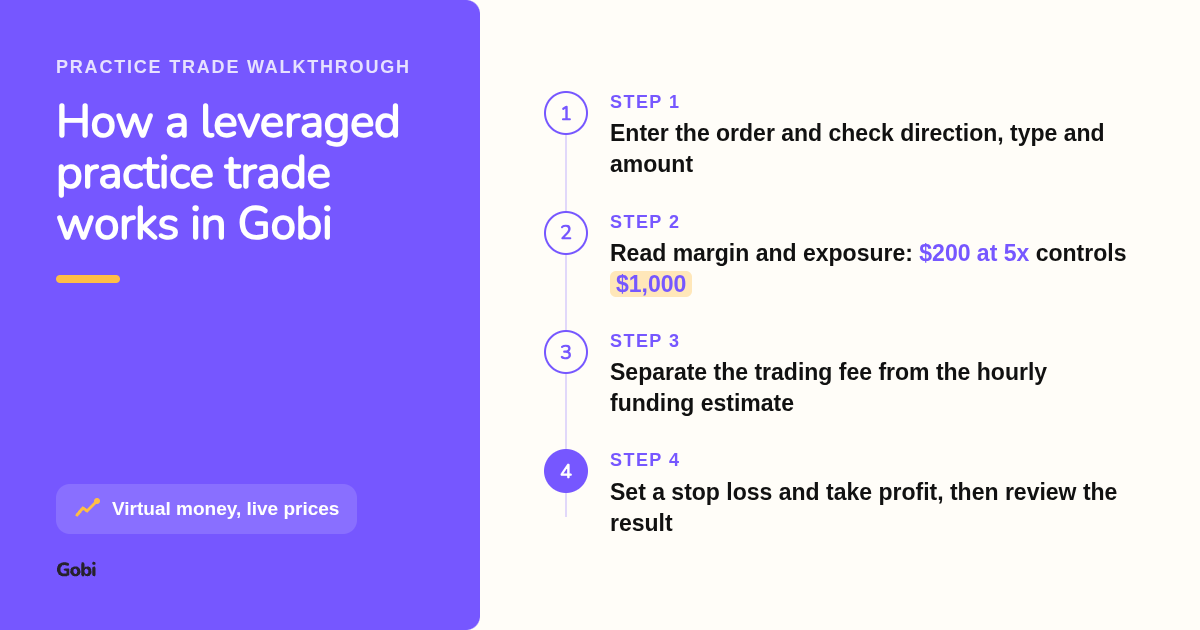
In Gobi, two virtual long positions with $200 of margin each behave very differently under leverage: at 2x the exposure is $400, and at 5x the exposure is $1,000. A 2% price drop produces a price-related loss of about $8 at 2x and about $20 at 5x, before fees and funding. These are illustrative figures, not current quotes.
This worked example comes straight from Gobi's own perpetual futures guide, and we use the same method inside the app's Learning Journey. The sequence is simple: open a lesson, place the practice trade the lesson describes, then explain the result in your own words.
Step one is entering the order and checking direction, type and amount before confirming. Step two is reading the margin and exposure lines so the leverage multiplier is never a surprise.
Step three is separating the trading fee from the funding charge. Gobi's own guides treat fees and funding as separate virtual costs, because the two are different numbers.
Step four is setting a stop loss and take profit, then letting the live price decide. Gobi's margin guide also notes that leverage alone does not determine the liquidation price, which is a detail most equity simulators never raise.
Practice with others helps the habit stick. Gobi includes a leaderboard and crews for practicing with friends, governed by the Gobi community guidelines, and 54,052 people had tried the app as of October 17, 2026.
What criteria shaped this ranking?
We compared each simulator on five published criteria: supported asset classes, whether a brokerage account is required, cost, data and fill realism as described in the vendor's own documentation, and mobile versus desktop availability. Facts about competitors come from their public product and pricing pages as of November 2026. Facts about Gobi come from the Gobi website and app documentation.
What is the fastest way to begin practicing in Gobi?
Getting started with Gobi takes three steps: install the free app on iOS or Android, open the Learning Journey, and place a first practice trade with virtual money at live prices. Nothing in the app uses real money, and you can set a stop loss and take profit on your very first position.
If you want to see the thinking behind the app before installing, the About Gobi page explains the educational simulator and why it exists.
Ready to practice leverage and risk without a brokerage account? Download Gobi for free on iOS or Android and start the first of 62 lessons today.
Which questions come up most about Webull paper trading alternatives?
Where should I paper trade?
Paper trade where your next real step will happen. Beginners who want to learn leverage, short selling and funding without opening a brokerage account should start with Gobi, which is free on iOS and Android. Options traders should use thinkorswim paperMoney, chart-focused traders should use TradingView, and global or futures traders should look at Interactive Brokers or NinjaTrader.
Can I make $1000 per day from trading?
No simulator, including Gobi, can promise that outcome. Virtual profits in paper trading do not predict future real-money results, because simulators do not reproduce slippage, partial fills or the emotions of real losses. Treat a practice account as a place to learn mechanics and risk, not as proof of a daily income.
Is anything better than TradingView?
For charting, TradingView is hard to beat, but for learning it is thin. TradingView's paper account fills at the quote and teaches nothing about margin or funding. Gobi is better if you want structured lessons on leverage and risk, with 62 short lessons across 11 units. thinkorswim paperMoney is better if you need real options chains inside a brokerage.
Can Webull do paper trading?
Yes. Webull offers a free paper trading mode for registered users, centered on US stocks and options, with real-time basic quotes and a separate subscription for Level 2 depth, as of November 2026. The main reasons people look for a Webull paper trading alternative are the account requirement, limited asset coverage and the lack of built-in lessons on leverage.
Which alternative lets me paper trade crypto or futures with leverage?
Gobi lets you practice perpetual futures on crypto, stocks, indexes and commodities with adjustable leverage, a stop loss and a take profit, all with virtual money at live prices. TradingView covers crypto symbols on its free plan, thinkorswim paperMoney and Interactive Brokers cover regulated futures, and NinjaTrader focuses on futures simulation on desktop.
Related Articles



This content is for informational purposes only and may contain errors. Please contact us to verify important details.